“I like to say that this is the worst that AI will ever be.”
Mike Libbey, Partner & COO at Canadian CFO firm YBL, makes the case that any curious accountant — not just developers — can build internal tools with AI. Once the bottleneck in his own firm, he started vibe coding at night and now runs 40+ apps built without a single developer, from a Calendly replacement (Bookly) to a tax-planning “dovetailing optimizer” that cut 8–10 hours of senior work per client down to about two.
The core workflow is deliberately low-bar: ask Claude or ChatGPT for an app idea based on what it knows about you, ask it for a comprehensive build prompt, and paste that into Lovable. He demonstrates this by generating a Canadian tax deadline tracker from a single prompt, then restyling it to his brand colours with one more line. Build the ugly, functional version first; polish the UI later; lean on screenshots to communicate changes.
He’s candid about the trade-offs. Use a build-vs-buy lens — buy complex, regulated, widely-available platforms (QuickBooks, Karbon, payroll) and build only the custom gaps. Weigh the real cost: tokens, time, ongoing maintenance, and the security/liability of client-facing tools where a break or wrong number is on you alone. Test relentlessly before going live, hand builds to teammates to break, and start small. The mindset shift he’s after: from a firm that uses technology to one that builds exactly what it needs, when it needs it.
Key lessons
- Start with one small single-purpose micro app, not a big platform — gross-up calculators or intake forms can ship in an afternoon.
- Use Claude or ChatGPT to generate an app idea and a comprehensive build prompt, then paste it straight into Lovable.
- Build the ugly, functional version first; fix colours and UI later in one or two prompts.
- Test and iterate hard before anything goes client-facing; internal tools carry less risk.
- Apply build-vs-buy: buy complex, regulated, widely-available tools (QuickBooks, Karbon, payroll) and build only the custom gaps.
- Account for the real cost — tokens, ongoing maintenance, and liability — before committing to larger showcase apps.
Tools mentioned
Resources & links
- Lovable tool
- Claude tool
- Supabase tool
- Karbon tool
- Lovable Academy learning
- Automation Town community
 , the AI meeting assistant for
accountants.
, the AI meeting assistant for
accountants. Mike Libbey — Partner & COO, YBL
02:52From bottleneck to building 40+ tools
Thank you, Trent, and I appreciate everybody for being here. Let me give you a little bit of the story of who I am, where I came from, and how we came to be here.
About two years ago, I personally was the major bottleneck in my own firm. Every pricing decision, every capacity question, every “Hey Mike, quick question” ran through me. So I did what any reasonable person does and I started building apps at night instead of sleeping. This stuff is exciting. It’s a little bit addicting. But today I want to show you how I went from that to an accounting firm that runs on the tools I built myself, and then I’m going to build one live in front of you so you can really see how easy it is.
It’s important to note that I am not a developer. I wasn’t born or bred into this kind of stuff, and I certainly didn’t go to school for it. I was just very, very curious. Either way, my goal is that you leave here knowing exactly how to start.
This presentation you’re looking at — it would not be a vibe coding presentation if I didn’t vibe code the presentation itself. It’s very exciting to take a look at the options, possibilities, and animations when you’re building a presentation yourself. Sometimes it can do a lot of the heavy lifting to make your life easier. I built this deck the same way I build any of my other tools.
05:13Live demo: an AI-powered hiring platform
Before we even start, I want to jump into a super quick demo to show you what’s possible out the gate, and then we’ll almost work backwards.
What you’re seeing on screen is an AI-powered hiring platform that we created from the ground up. I built this in a weekend on my phone. It’s a bit of an HR portal. When somebody is a candidate looking for what jobs we have open, they can just go to careers.ybl.ca and take a look at the roles. It tells them about who we are, some perks of the business, perks of the culture, our values, and frequently asked questions.
Something interesting we’ve been able to create here is not just a spot to showcase the roles, but assessments built right in. For one of the roles — we’re currently hiring an AI Solutions Architect — we’ve created an assessment where candidates provide some information, their resume, and tell us about themselves. As they go next, next, it shows them exactly what we’re looking for, and they can answer questions about their experiences and, importantly for a role like that, some things they’ve built.
Much more exciting than the candidate side is the admin side. I’ve got this on a demo mode, so it’s just fake information. But it makes our life as the employer considerably easier. It tells me exactly who I must hire, who’s a strong hire, who’s a not-as-strong hire. How many people have clicked, an analytics overview. It compares them via list or pipeline.
But that’s not all. I created a quick review option where we can quickly take a look at who makes sense — do I want to interview them, do I want to go to their full profile? And I said that’s still too much work. So the AI-powered “who to interview” spot makes that one step easier. Right now it’s analyzing the candidates. It knows what we’re specifically looking for, and it’s about to tell me in what order we should take a look at these individuals and what makes them the standouts for our shortlist. I could click “advance all” and it would directly reach out to all of them and start scheduling interviews. Just a little teaser to understand what’s possible.
07:38Who I am and why vibe coding matters
So who am I and why am I even qualified to be speaking to you today? I’m Mike Libbey, Partner and COO at YBL, a Canadian CFO firm. We’ve got about thirty people across the board, all across Canada and a couple of people overseas. We won Karbon’s AI Innovation Award last year, and I’ve recently started a YouTube channel. I’m not a developer — there’s nothing pertaining to development on this slide — but I get very excited by AI and the advancements of technology, and we want to spread the love.
So what is vibe coding? Andrej Karpathy said it’s a new kind of coding where you fully give in to the vibes, the exponentials, and forget the code even exists. In my eyes, it’s something where you describe what you’re looking for in plain English, it creates whatever you’re looking for, you test it, you iterate, you enhance it, you tweak it, and you share it — whether it’s an internal tool or an external tool.
It’s important to understand this can be extraordinarily complex, but it can also be extremely easy and approachable. You don’t need to overthink it. You don’t need to give it a novel or spend millions of hours figuring out the perfect app. You can create one small, simple micro app — as I call them — that’s a little bit niche to your situation, start with that, and then snowball from there. It’s basically creating things with words as opposed to understanding the specific coding element.
09:50What vibe coding looks like in practice
I’ve created, via vibe coding, a quick sixty-second video that gives an overview of what vibe coding really is. As we all know, everything is scattered across the board — manual onboarding, spreadsheets, email follow-ups, missed deadlines. But what if you could just describe what you need? You type in an example of what you’re looking for. That’s it. No code required. And it just does it.
A few quick examples on the screen: a client onboarding portal, a tax season dashboard, internal scheduling tools. It’s easy to get that first ball rolling. The question becomes: how do you tweak it? How do you make sure it’s working properly for you? Well, you keep building, you keep asking questions. You say, “Can you tweak this? Can you make this a different color?” That’s vibe coding.
My story: I’m an accountant. I’ve been an accountant for seventeen years. I’ve never taken any computer science classes, never worked at a tech company. I love technology personally and professionally, but I don’t know what most of the words on a developer’s website mean — C++, JavaScript, React, all that technical jargon. It doesn’t make sense to me. But I caught a little bit of the bug and kept going down that path. It was 2023 and 2024 just starting to experiment, and 2025 was really when I hit the ground running and started building apps on apps on apps.
We’re now at the point where I’ve got over forty apps that we use every single day within our firm — everything from that hiring platform all the way to higher-level showcase apps with client portals. All built by me, zero developers, and everything’s moving faster, faster, and becoming easier. The bar of creation is at an all-time low. This is the worst that AI will ever be — the slowest and most difficult it’s ever going to be. So you can only imagine where it’s going to go.
I really need to hammer this point home: I’m just an accountant who got curious, and you can do this too. This is not me showcasing “look at me, look at all I’ve done.” My team has been a major part of this. The point of saying I built these myself is that you can do this too — you just need to get a little bit curious and play around.
12:48Why now: talent, client expectations, and tech sprawl
Why should we take a look at this stuff now? Other than the fact that AI is at the worst spot it’ll ever be, that it’s simple and approachable, and the build-versus-buy conversation — there are many reasons to consider building apps yourself, whether internally to create efficiencies or externally for showcase apps like client portals and calculators.
You’ve got a talent crisis. This isn’t new. For the majority of firms, we cannot hire fast enough, the pipeline of new accountants is shrinking, and demand is exploding. You can’t out-hire this. So what can we do to create efficiencies that mitigate some of that? If I can work faster and make my current employees’ lives easier so they can take on higher-leverage work, all the more reason to do it.
At the same time, our clients have rising expectations. Some of them are aware of the advancements in AI. They’re looking for higher touch points — moving from reactive to proactive, or “Hey, I saw somewhere they had dashboards” versus the typical financial report. We need to meet them where they’re at.
From a tech-stack fragmentation standpoint — it’s app overwhelm. How many logins? How many places am I going? Other than the joke of building an app to hold all of my vibe-coded apps, you want to reduce that fragmentation, and with APIs and connectors it becomes much easier to have these tools talk to each other.
I also believe compliance is commoditized. I don’t believe compliance is going to be the future. You can already see this in many countries where simpler tax returns are being handled by the government. I believe the human element from advisory is really where the margin comes into play, and AI can help you advance that to provide extremely proactive advice.
15:11You don’t need a magical toolkit — just Lovable
You do not need a degree, a development team, or a budget. There’s the option to hire a developer that might cost you a hundred and fifty thousand dollars a year. There are no-code tools like Zapier, which can be fantastic, but the barrier to entry can be slightly higher. And then you’ve got vibe-coded tools where there’s no limits, no middleman — you can build exactly what your firm needs.
The customization here is completely limitless. If you have a tool off the shelf that’s working great, ninety-nine percent sufficient — what about that one percent? Is there a possibility you might create that one percent and add it to the tool, or connect it, or build it from the ground up? That’s something to weigh yourself.
A lot of people think there’s a magical toolkit where you have to use this app and this app and put them all together. That’s really not the case. For me personally, it’s really Lovable that gets you most of the way. I’m not here to give a specific Lovable tutorial or compare it to alternatives — there are a million apps you can use to vibe code, and you can create a lot of these things directly in Claude or ChatGPT now with artifacts. My personal weapon of choice for user-friendliness is Lovable. I also use things like Claude Code, I connect it to Supabase and more technical stuff, but you can just start with Lovable.
16:41Build vs. buy: what I won’t build
What does this mean for your firm? I’m consciously aware that I have fantastic relationships with a lot of software vendors, and it becomes a slippery slope. But there are many apps I have no interest in building, such as QuickBooks Online or Karbon — those heavier showcase apps. The time has come, though, where you can think: can I build something here? Do I need to wait for software vendors to build what I need, or can I build it myself at night from my phone or on a weekend? Instead of complaining about the gaps in your stack, you can potentially fill them yourself.
You can create custom, unique client experiences. For our clients now, end to end, we’ve created an experience where the forms they fill out are as simple as possible — there’s no form builder out there that makes it this simple. It’s got beautiful videos that make it a premium experience that just doesn’t exist with off-the-shelf products.
Advisory is not for everybody and it’s not the path everybody needs to take, but it’s important to understand what’s going to be the differentiator now and in the future. Nothing’s wrong with compliance. Clients don’t value compliance as much as helping their business. We do thousands of tax returns, so compliance is extraordinarily important to us, but you have to determine what’s going to future-proof what you’re looking for.
18:20A tour of the apps we built
Let me show you some of the things we built so your wheels start turning. This is just a few of the apps. You’ve got our YBL Tax Pilot — a year-round personal tax intelligence tool for Canadians. We’ve got the dovetailing optimizer, our tax planning software that automatically determines the best method of payment for corporation owners. We’ve got Client Flow, a complete onboarding portal end to end. We’ve got Bookly, which completely replaced Calendly for us because Calendly wasn’t doing a couple things we needed. Then the simpler ones — a gross payroll calculator, some simple tax buddies, custom link trees. And my favorite personal one is Logan’s Learning Adventure, which I built in the airport on my phone for my son before a flight, where he can play Xs and Os, do spelling, word searches, and math activities right from his iPad.
Let me dig into a few showcase apps, from simpler to more complex.
This is a single-purpose tool — Ontario payroll, gross-up. That’s really it. While I have no interest in touching payroll platforms, this one has a very specific purpose. A client says, “Hey, I paid my employee $3,242 and forgot to determine what the deductions were.” We can gross this up and determine exactly what that is. It’s the kind of thing anybody in this room could ship in an afternoon. The bar is lower than you think. Some of the best vibe-coded tools are not big platforms — they’re small single-purpose tools that solve an annoying little problem.
21:26Bookly and the dovetailing optimizer
The next one is Bookly, our Calendly replacement. We ran into roadblocks — some people on our team really wanted to use Microsoft Teams, some wanted the company-wide Zoom account because they only use Zoom once every few months, some had personal Zoom accounts, and that wasn’t possible inside Calendly. There were also routing-form issues. So we built it from the ground up and replaced Calendly fully across the team, with everything custom and unique to the way we like to work.
The dovetailing optimizer is that tax-planning tool, and it was one of the very first ones I created. I bit off a little more than I could chew in the beginning, so be careful about that. On at least an annual, typically monthly or quarterly basis, we take a look at client situations from a corporate and personal perspective, dovetail them, and determine the most tax-efficient way to pay these individuals depending on their goals — sometimes tax efficiency, sometimes qualifying for a mortgage, anything in between.
We created this tool from the ground up that not only showcased all the work we were doing behind the scenes, but automatically determined those scenarios and strategies once we plugged it in. One of the most exciting things: it typically took our senior accountants and CFOs anywhere from eight to ten hours per client in the past. Not only were we able to reduce this to about two hours, but an hour and a half of that we were able to de-skill and put on the admins’ plates. That freed up senior accountant time to review the work and spend more time on the human interaction with the client. This was a big, big unlock — clients could view all of it, choose their ideal scenario, and get a video from us explaining it.
22:53An end-to-end client management platform
We built a full end-to-end client management platform — a full onboarding flow with intake forms, an automated quote builder with variability based on the mapping of those intake forms, all the way to an automated proposal builder. We click a button, it sends the client the email, they fill out the forms, it creates a specific quote and justifies it to us with all the logic behind the scenes, and then it creates the proposal. We click a button and send it off to the client, with automated follow-ups and connections to QuickBooks.
One of my favorite features is the scope-creep repricing advisor, which happens automatically — it’s connected to our Karbon and QuickBooks and sees everything in the same spot. This is a really big standout showcase app, primarily behind the scenes other than what the client sees from a proposal and forms perspective.
Finally, Tax Pilot — one of the tools most exciting to me, because one of the things we love is showing clients things that make sense and are jargon-free. To have a year-round tax intelligence platform for every single one of our thousands of clients — tools in their hands from RRSP optimization to household assets and strategies, a visually appealing and understandable way to see their tax return and say “that makes sense to me” versus a fifty-page PDF that only makes sense to some accountants. We’re putting the power back in our clients’ hands, and it’s been a resounding success.
24:39Live build: from a blank Claude prompt to an idea
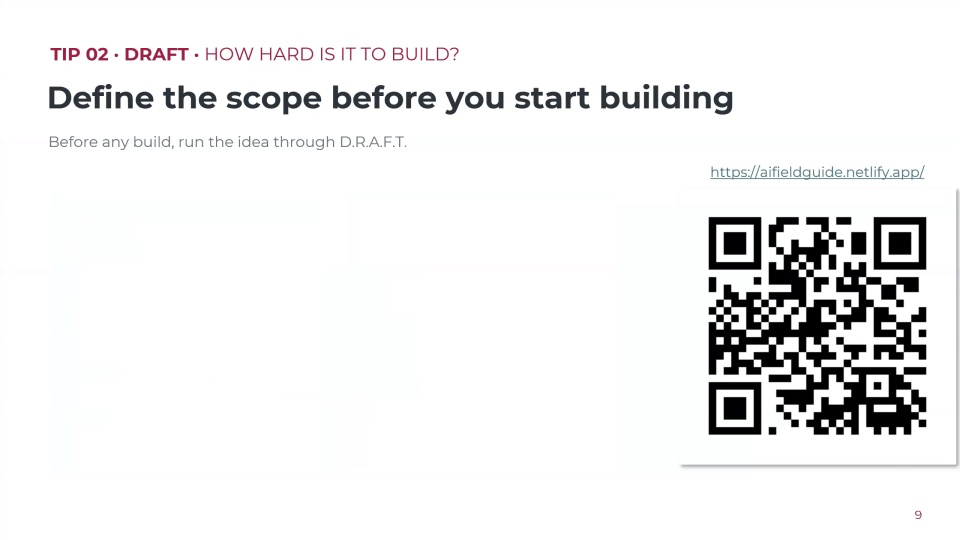
Now I’m going to build something live and show you what’s possible. Little caveat — by all means, take a look at the QR code. If you want to build with me in Lovable, you can get a free couple of credits. Even if you’re using something else, that’s perfectly fine, even directly in Claude.
I’m going to jump over to Claude. There is absolutely no context in this Claude whatsoever. I’ve simply told it: “I’m an accountant and I’d like to build a simple app for Lovable. Give me a few ideas of things that would be pretty simple to build but impactful for me, my clients, or my prospects.” Completely open-ended. I did not overthink this prompt.
Here’s a pro tip. You’ve probably chatted with ChatGPT or Gemini or Claude, and it probably knows a little about you. I just gave it very limited context. Instead of saying it this way, I’d strongly suggest you say, “Based on everything you know about me, what is an app you think I could build that would make my life more efficient, save me time,” whatever you’re looking for. It will probably come up with a few fantastic ideas.
Funny story — I actually did this at my barber’s last week. He pulled up his phone, I was explaining it, and he did it. True story. I had him download Lovable right there as I was walking out the door, and he messaged me at 5:40 in the morning telling me he was going to bed because he kept playing with the Lovable app all night. So be careful — it can be very addicting.
It gave me a few options: a document checklist portal, a tax deadline tracker, a business expense categorizer. I locked into the tax deadline tracker.
27:00Generating the prompt and building in Lovable
So I said, “Give me a prompt for the tax deadline tracker so I can build it in Lovable.” And by the way, you can make mistakes or typos — it’s likely to understand what you’re saying. Importantly, I said, “Make it comprehensive.” We can go crazy — “follow my brand guidelines, make sure it does this and that” — but I want the bar to be extraordinarily low for everyone. I always use something like “make it comprehensive” because it flushes it out a little more and gets more specific. It goes without saying you can tweak these prompts. It gave me a build prompt for a Canadian tax tracker web app with specifications, user features, and all that fun stuff.
I copied it and went to Lovable and pasted it. When you get to Lovable, or whatever weapon of choice you’re using, you paste in your prompt and you’ve got the option to just build it directly, or plan it — “plan” means you can talk to Lovable and hash it out, and it’ll ask you questions. I just jumped right to it and said build this, pasting that prompt Claude gave me directly into Lovable.
The reason I’m not doing this completely live is that it took about ten minutes to build. Sometimes it can be much simpler — thirty seconds or so — but on the first prompt it usually takes some time to be accurate.
This is what it gave us, and for a first prompt it’s fantastic. You can see upcoming deadlines, sort by category, search for deadlines, search for business types. It’s got a full calendar view where you can take a look at all the deadlines and filter them, and a list view. I’ve done nothing else other than paste what Claude told me to. There are settings — I can say I don’t want to see personal taxes, or I don’t want to see GST/HST, tweak reminder windows, change the fiscal year-end — tons of options.
29:11Iterating on design, and a warning on testing
Then I said, “You know what, I don’t like these colors. I’d strongly prefer black and red.” So I typed in another version: “My brand colors are red and black, make this app follow my brand colors.” And I liked the dark theme — I’m a sucker for dark theme. It completely overhauled it to be much more appropriate. It’s as simple as that. I cannot stress that enough.
Now, whether this is a functional tool or you need to tweak everything before it goes live is extremely important. I’d strongly suggest people be a little more cautious about what they’re rolling out, especially when it’s client-facing. It’s a little different when it’s internally facing, but when it’s client-facing you need to make sure you’ve tested this as much as humanly possible. There are so many scenarios where it tells you it’s built this out perfectly, but perhaps it hasn’t yet. So you need to test, iterate, test, iterate.
You can tweak every single part of this. I also strongly suggest you use screenshots a lot. You can screenshot something, pop it directly in the chat, and say, “I’d like you to change this to do X” or “make sure it does Y.” This is a very simple, very easy app — as simple as going into Claude or ChatGPT, saying “give me some ideas,” it gives you one, you say “give me a prompt,” you throw it in Lovable, and it just builds it.
Whether you’re changing functionality or visuals, I’d strongly suggest you focus on functionality first before you jump to visuals. The visuals will suck you in because you want a shiny, pretty app, but the important part is that it’s functional at the end of the day. So go wild, get comfortable, but make sure you’re playing around with these tools before you go live client-facing.
31:31The builder’s mindset and going more technical
Once you build that first tool that solves a real problem in your firm, your brain almost rewires. You’ll start seeing problems everywhere. Every annoyance is suddenly a project. Every time I’m talking to somebody internally, they say something and it triggers something in my mind, and I immediately add it to the list of things I need to build. It’s turned me from a non-technical individual into a slightly more technical one because I just get curious.
The question that ends up happening for a lot of people: Lovable will prompt you to use Lovable AI or Lovable Cloud. You might want to ask Claude or ChatGPT, “Is that the best option for me, or is there an alternative?” For us, to get a little technical, we use Supabase for our databases and back end because a lot of that is more customizable. So understand it might end up turning you a little more technical than you anticipated.
The loop is instant, and that’s mostly a good thing because it turns operators into builders. People who used to complain about a workflow will end up fixing it themselves. Once you see that feedback loop — “this isn’t working,” you click a couple of buttons or type a couple of things, and now it’s working — it gets exciting. Every problem ends up being a problem you can very likely fix yourself. I can’t say every problem is fixable, but a lot of them can be, and you don’t need to wait for support. That’s a gift and a curse, because you’ll catch me at all hours on my phone using Lovable or Claude Code, but it’s powerful to have all of this at your fingertips.
33:11The build vs. buy framework
Let’s jump into the build-versus-buy framework. In my eyes, buy when it’s complex, regulated, or widely available — like QuickBooks Online, your tax software, your payroll engine. I’m not building those. I’d rather buy them and integrate them as appropriate. I’m actively looking for vendors that are very AI-forward and forward-thinking, because that’s the world I’m playing in.
Karbon is another fantastic example. Practice management is the same story — a full workflow platform that’s very integrated, well supported, and works incredibly well. We’ve been using Karbon for over nine years, and they’re one of the most forward-thinking practice management companies in the industry, and only moving faster. It’s exciting to work with companies you know are on the bleeding edge.
If something requires an integration you can’t build, that’s a different story. But you want to make sure it’s all working for your specific workflow. That’s one of the exciting things — it’s specific to your workflow. I’ve built so many things that just don’t exist, but also so many things that are just slightly different than what’s on the market, more approachable and accessible, or where there’s no off-the-shelf tool with exactly what we need.
Most of you are going to start with something simple, like an internal calculator, intake forms, or something you can put on your website as a lead-gen magnet — “answer these couple of questions.” Those are easy and accessible. I’d strongly suggest you start there to get your wheels turning.
35:23The real cost: time, maintenance, and liability
It’s extraordinarily important to mention the real cost. I’ll read this verbatim: I’ve absolutely spent more money and time on this than I saved, and I’d do it again. This is not for everybody, and you need to understand how it works before you commit.
While I’ve definitely spent more money than I theoretically saved in the beginning, that’s short-term pain for long-term gain, and it’s by design. I knew I was testing, breaking, iterating, getting comfortable. All of that together became a major unlock that ultimately saved us considerable dollars. But you have to be conscious. You’ll hear words like tokens, limits, or APIs and the costs associated with that.
It’s extremely important, if you’re going down a deep path for larger showcase apps, to understand what this is truly costing you in time. If I calculated the hours I’ve spent vibe coding, and the alternative was me working on client work, this would not make sense. It was approachable for me because I did it in the mornings and at night, when I wouldn’t already be working. But if you aren’t doing it at night or on your phone or in the morning, you have to see what’s really costing you time, money, and energy.
Another extremely important one: what does ongoing maintenance look like? If I build an app replacing Calendly and take for granted what Calendly does, and it breaks this day and the next day and the next week, what’s that costing me if I have to drop everything and fix it on the fly, or we’re missing meetings, or clients didn’t get the Zoom link? That could be very painful. And worse, with showcase apps, if it’s breaking or providing inaccurate information to your clients, that’s not a good experience.
You have to understand the risk and liability. We haven’t deeply talked about client security, confidentiality, or SOC 2 compliance, and I’ll leave that up to you to determine what you’re comfortable with regarding putting client information in here. That’s a personal decision, but understand the risk when it’s just you — if something goes wrong, there’s no pointing the finger at a third party. And what happens long-term if it breaks, if the company got hacked? Weigh that before you build all of these tools.
38:22How to get started today
How do you get started today? Spot that annoyance. And even more important than spotting the annoyance: if it’s not on the tip of your tongue, ask ChatGPT, Claude, or Gemini. It probably knows a lot about you — more than you think. Ask, “What is something I should build based on all you know about me?” And if it doesn’t know about you, that’s okay — give it as much context as possible: “I’m an accountant who runs a virtual CFO firm in Ontario using these systems. What do you think I should build?”
A lot of people get paralysis by analysis. They want to spend weeks planning methodically. There’s nothing wrong with that, but understand that if you get started and see what’s possible, it’s going to unlock something and rewire your brain.
Describe it like a new hire — plain English. Who uses it? What should it do? How can you determine if it’s successful? The more context, the more accurate it’ll be. Build the ugly version first. Don’t worry about the UI or the prettiness — that can be fixed in one or two prompts. Get it working and working accurately, solving the problem you set out to solve.
Finally, hand it to a teammate. Have AI champions internally — whether that’s you or somebody else — and get somebody else breaking it. You desperately need that feedback, like any company, designer, or builder. Get as many people as you can taking a look, breaking it, and giving you feedback so you can iterate before you go wider and wider. That’s exactly what we do at YBL.
40:36Pro tips and first-build ideas
Here are some pro tips — definitely take a screenshot of this. Start super simple. One thing at a time — don’t try to build a million apps or a billion features. Refine that prompt; I just copy-pasted that Claude prompt into Lovable, but refine it so it makes sense for you. Use plan mode in Lovable or any other tool so it can chat with you and ask questions before it builds.
Save those guidelines — say, “Remember this, put this in the README file.” Tell it to remember the information. If you built something you like — for example, I built a bunch of slide decks, with one master template, and I just click remix and it duplicates that — make sure you’re templating as best as possible. Set a time limit; don’t waste hours forcing something to work when it just might not. Talk to it like a person. Screenshot your errors — show, don’t tell. Screenshots, screenshots, screenshots; that helps far more than words. Remember: better context, better results.
Use UI inspiration — this has been tremendous. We have a brand book from our marketing agency. I just upload that brand book and it knows everything about us — our values, how we speak, our jargon or lack thereof, our colors — and that makes life much easier. Break it into bricks. Inch by inch, it’s a cinch; yard by yard, it’s hard. For bigger showcase apps, break it into bricks and do it one piece at a time. And if you make a mistake, you can undo it and revert to prior versions.
If you’re going to use Lovable, use academy.lovable.app — it’s got free courses to level up. And one thing that’s extraordinarily important is community. My good buddy Chad Davis runs Automation Town — he doesn’t pay me to plug it, I just want to spread the good word. If you want an accounting community specific for accountants, bookkeepers, or operators of the whole firm, take a look at Automation Town.
Some first-build ideas: an intake form, a fee estimator, a deadline tracker, an onboarding checklist, a team task board. If you’re in the early stages of your company and don’t have a massive practice management platform like Karbon, you can have a little Kanban dashboard with your to-dos. Or a client FAQ or portals.
43:28From a firm that uses technology to one that builds it
For us, one question really changed everything. It went from “Can we buy a tool for this?” to “Can we build a tool for this? Does it make sense for us to build this or not?” There are some tools I have no interest in touching for the maintenance alone, never mind the setup, but it’s important to weigh that option and do that due diligence.
As opposed to being an accounting firm that uses technology, we’re now a firm that builds exactly what we need, when we need it, specific and custom to us.
That’s it for me. I appreciate everybody’s time. Hopefully this gives everybody a little bit of confidence to just go out there, ask ChatGPT or Claude what you should build, and get building — because it’s a whole new world on the other side, and it’s an exciting one. Thank you for having me.