Fixed-fee package calculator
Price your fixed-fee packages from your own team costs and hours, and see the margin and effective hourly rate on every one before you quote.
- About 10 minutes
- Works offline
- Tested 11 Nov 2026
Free. Opens in Chrome, Edge or Safari. Read the disclaimer first.
What it does
Fixed fees only work if you know what each package costs you to deliver. This shows it, package by package.
- 01 Enter your own team Each role’s cost and charge-out rate, or a target margin. Your numbers only.
- 02 Build your services Hours by role and how often: bookkeeping, BAS, year-end, payroll, advisory.
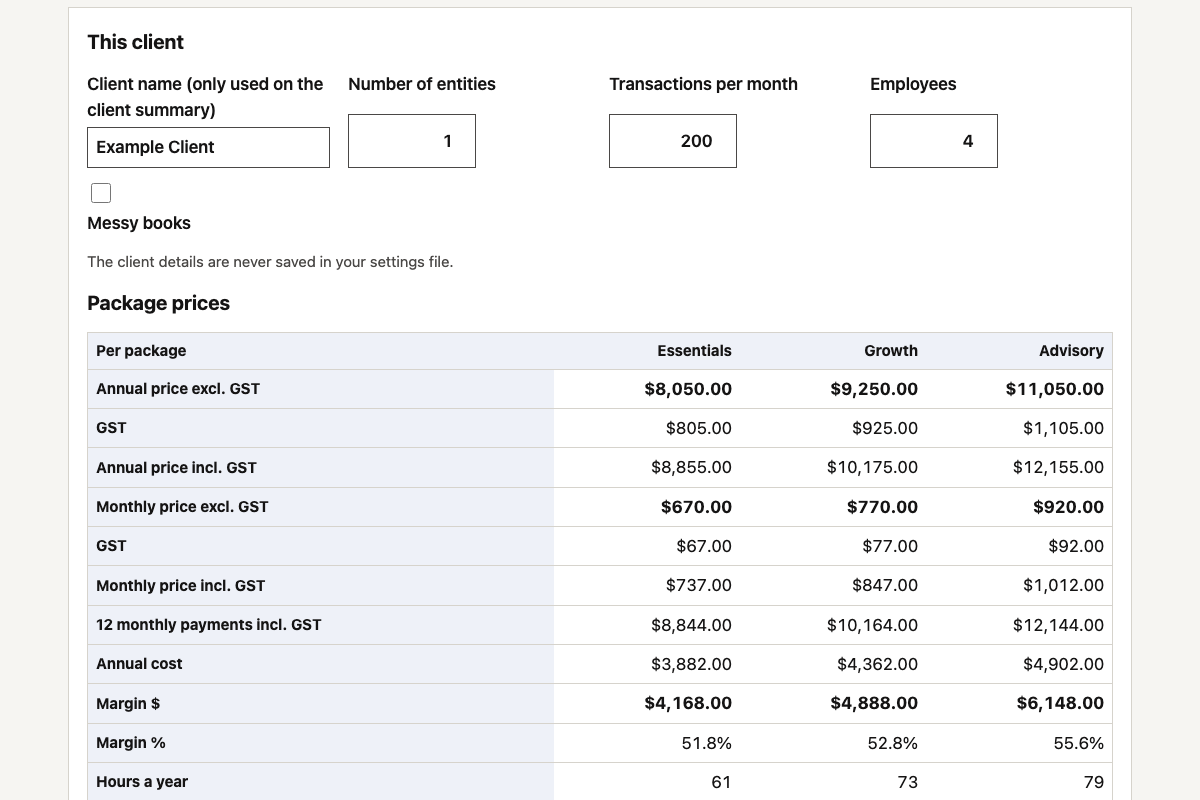
- 03 Package and price Tiers with client modifiers, priced annually and monthly, with and without GST.
- 04 See the margin Cost, margin and effective hourly rate on every package, plus what-if scenarios.
Where your data goes
The AI only sees the prompt and made-up example rates. Your own costs and rates stay in the tool on your computer; save them as a settings file you keep.
That’s all the AI ever sees. It writes the tool and hands back the code.
A rule inside the file blocks every internet connection. Nothing is saved, and closing the tab wipes it.
For beginners · about 10 minutes
Build your own in five steps
-
Step 1: Turn off model training
Claude: Settings › Privacy. ChatGPT: Settings › Data controls.
-
Step 2: Give the prompt to Claude or ChatGPT
It builds the whole tool in one answer. If it stops, reply “continue”.
The prompt
Opens a new chat with the prompt. Long prompts go on your clipboard: paste into the chat that opens.
Works without client data. Don't paste client names, tax file numbers or ledgers into an AI tool your firm hasn't approved for them. AI data safety playbook.
Read the full prompt (14,366 characters)
I run an Australian accounting or bookkeeping firm. Build me a private fixed-fee package calculator that I'll run on my own computer, so I can price fixed-fee packages from my own costs and see my margin. Build the whole thing in one go, using the defaults below. Don't ask me questions first. SAFETY RULES (these override everything else) 1. Never ask me to paste real client or staff details into this chat. While we build and test, use only the made-up sample below. 2. Deliver ONE self-contained HTML file that I save and open from my own computer. No server, no account, no installation. 3. The file must make no network connections of any kind. No external scripts, libraries, fonts, images, CDNs, analytics or tracking. No fetch, XMLHttpRequest, WebSocket, sendBeacon or EventSource. No forms that submit anywhere. No links that carry data. Saving settings is a file the page makes itself (a Blob download) and loading them is a file input read with FileReader; neither is a network connection. 4. Put this exact Content-Security-Policy meta tag first in the <head>, so the browser itself blocks any connection: <meta http-equiv="Content-Security-Policy" content="default-src 'none'; script-src 'unsafe-inline'; style-src 'unsafe-inline'; img-src data:; connect-src 'none'; form-action 'none'; base-uri 'none'"> 5. Don't store anything in the browser. No localStorage, sessionStorage, IndexedDB or cookies. Settings stay in memory until I save them as a file, and closing the tab wipes them. Add a "Clear everything" button, and a warning before the tab closes if I've changed anything since I last saved my settings. 6. My fees are my decision. Don't suggest fee levels, "typical" prices, market rates, benchmarks, averages or what other firms charge, anywhere in the tool or in your reply. Never use language about firms aligning, matching or coordinating their prices. Every number the tool uses comes from what I type in. The only built-in numbers are the sample below, which must be labelled "Made-up example rates — set your own" wherever they show. If I ask you what I should charge, tell me that's my call and help me with the maths instead. Show these two lines permanently at the top: "Your fees are your decision. Set them from your own costs, capacity and value." "Runs offline on your computer. Nothing you type leaves this page." WHAT IT DOES A toolbar above the tabs: "Save settings", "Load settings", "Load sample", "Clear everything", "Run self-test". Then five tabs: 1. Team, 2. Services, 3. Packages, 4. Prices, 5. Client summary. 1. Team - Firm name. - A table of roles, with Add and Remove. Each role has a name, a cost per hour (what an hour of that person costs me: wages, super and overheads) and how it's priced: either a charge-out rate per hour, or a target margin %. For a target margin, charge-out rate = cost ÷ (1 − margin ÷ 100), rounded to the nearest cent, and show the resulting rate in the row. A margin must be from 0 to 95; anything else shows "Margin must be 0 to 95%" in the row and is treated as 0. - Rounding: a step in dollars (default 10) and a mode, "nearest" (halves round up) or "always up". A step of 0 means round to the cent. - Target effective hourly rate: optional, blank means none. - Messy books multiplier: default 1, meaning no change. It multiplies the hours of services marked "affected by messy books" when the client has messy books. - Explain in one line: "Margin is the share of the price left after cost. It is not the same as markup." 2. Services A table of services, with Add and Remove. Each service has: - name; - how often it's delivered: monthly (12 a year), quarterly (4) or annual (1); - what it's counted per: "each delivery", "per entity", "per employee" or "per 100 transactions a month"; - hours per unit for each role (one column per role, so a new role adds a column); - a complexity multiplier (default 1); - "affected by messy books", yes or no; - an optional pass-through cost per unit (for example a software subscription I pay for and recharge) and a pass-through markup % (default 0). Put the table in a box that scrolls sideways if it's wider than the screen. 3. Packages Packages (tiers) as columns and services as rows, with a tick box in each cell to include that service. Add, rename and remove packages. 4. Prices - A "This client" box: client name (optional, only used on the client summary), number of entities (default 1), transactions per month (default 0), employees (default 0) and messy books (yes or no). - A results table with one column per package and these rows: annual price excl. GST, GST, annual price incl. GST, monthly price excl. GST, GST, monthly price incl. GST, 12 monthly payments incl. GST, annual cost, margin $, margin %, hours a year, effective hourly rate. If a target effective hourly rate is set, add "against your target" (above, below or on target) and "price at your target rate". Show a negative margin in red. - Under each package, a fold-out breakdown by service: hours a year, cost and price. - A scenario comparison (see below). - Everything recalculates as I type. Changing any rate, hours figure or setting updates every package at once. 5. Client summary - A plain one-page summary I can give the client: firm name, "Prepared for" and the client name (if given), today's date in Australian format, then for each package its name, the services it includes, each written as the service name, a colon and how often (for example "BAS/IAS lodgement: each quarter"; use "monthly", "each quarter" or "once a year"), the monthly price incl. GST with the excl. GST price and GST shown underneath, and the annual price incl. GST. - It must never show hours, costs, margins, charge-out rates or the effective hourly rate. - End with "Prices are in Australian dollars. GST at 10% is shown separately." - A "Copy summary" button (plain text, with a fallback if the clipboard is blocked) and a "Print" button that calls window.print(). Print styles show only the summary, whichever tab is open. - While the sample is loaded, the summary also shows "Example only: made-up example rates — set your own." THE MATHS (use exactly these rules) - Deliveries a year: monthly 12, quarterly 4, annual 1. - Units: each delivery = 1; per entity = number of entities; per employee = number of employees; per 100 transactions a month = transactions per month ÷ 100. - A role's hours a year in a service = hours per unit × complexity × messy factor × units × deliveries a year. The messy factor is the messy books multiplier when the client has messy books and the service is affected; otherwise 1. - Service labour cost = the sum of (role hours a year × that role's cost per hour). Service labour price = the sum of (role hours a year × that role's charge-out rate). - Pass-through cost = pass-through cost per unit × units × deliveries a year. Pass-through price = pass-through cost × (1 + markup ÷ 100). - Work in whole cents. Round each service's labour cost, labour price, pass-through cost and pass-through price to the nearest cent, then add the services up for each package. Before any rounding, round to 6 decimal places to remove floating-point noise. Halves round up. - Package cost = labour cost + pass-through cost. Unrounded price = labour price + pass-through price. - Annual price excl. GST = the unrounded price rounded to the step. Monthly price excl. GST = annual price ÷ 12, rounded to the step. (Twelve monthly prices won't always add up to the annual price; show both as they are.) - GST = 10% of the price, to the nearest cent. Price incl. GST = price + GST. Do this for the annual and the monthly price. - Margin $ = annual price excl. GST − package cost. Margin % = margin ÷ annual price × 100, shown to 1 decimal place. - Effective hourly rate = (annual price excl. GST − pass-through price) ÷ total hours a year. - Price at your target rate = total hours a year × target rate + pass-through price, rounded to the step. - Never divide by zero. If the annual price is 0, margin % shows "n/a". If total hours are 0, the effective hourly rate shows "n/a". NaN and Infinity must never appear anywhere. - Treat any blank, negative or non-numeric input as 0, except the scenario percentages below, which can be negative. Show money as $8,050.00. SCENARIO COMPARISON Three inputs: hours change % (default 20), cost per hour change % (default 0) and charge-out rate change % (default 0). They can be negative (a decrease); a change below -100% counts as -100%. They apply to every role and every service; pass-through amounts don't change. A table with one row per package shows: - Now: annual price, margin $, margin %. - If the price stays the same: the new cost, margin $ and margin % at today's annual price (hours and cost changes only). - If you reprice: the new annual price rounded to the step (all three changes), its margin $ and margin %. SAVING AND LOADING SETTINGS - "Save settings" downloads fee-calculator-settings.json, made with a Blob, URL.createObjectURL and a link with a download attribute, then revokes the URL. The file starts {"format":"fixed-fee-calculator","version":1, and holds the firm name, rounding, target rate, messy books multiplier, roles, services, packages and whether the sample label is on. - The "This client" box and the scenario inputs are never saved. The file holds the firm's settings only, never client details. - "Load settings" opens a .json file with a file input and FileReader. Parse it with JSON.parse inside try/catch (never eval). Check the format and version, then rebuild the settings field by field: keep only known fields, make every number a finite number of 0 or more, keep text as plain text, and drop hours or package ticks that point to a role or service that doesn't exist. If the file is wrong, say so and keep the current settings. - Saving and then loading must give back exactly the same settings. SAMPLE (labelled "Made-up example rates — set your own") "Load sample" fills in the following. While it's loaded, show a banner on every tab: "Made-up example rates — set your own." with a button "These are my own rates now" that removes the label. - Firm name: Sample Practice. Rounding: step 10, nearest. Target effective hourly rate: 150. Messy books multiplier: 1.5. - Roles: Partner, cost 90, charge-out rate 300. Senior accountant, cost 60, target margin 50%. Bookkeeper, cost 40, charge-out rate 100. - Services: 1. Monthly bookkeeping: monthly, per 100 transactions a month, Bookkeeper 1.5 h and Senior accountant 0.25 h, complexity 1, affected by messy books. 2. BAS/IAS lodgement: quarterly, per entity, Senior accountant 1.5 h and Partner 0.25 h, complexity 1, affected by messy books. 3. Annual financial statements and tax return: annual, per entity, Senior accountant 8 h and Partner 2 h, complexity 1.2, affected by messy books. 4. Payroll (per employee per run): monthly, per employee, Bookkeeper 0.25 h, complexity 1, not affected. 5. Advisory meeting: quarterly, each delivery, Partner 1.5 h, complexity 1, not affected. 6. Xero subscription pass-through: monthly, per entity, no hours, pass-through cost 70, markup 0, not affected. - Packages: Essentials = 1, 2, 3, 6. Growth = 1, 2, 3, 4, 6. Advisory = all six. - This client: Example Client, 1 entity, 200 transactions a month, 4 employees, books not messy. ACCURACY Add a "Run self-test" button that shows pass or fail for each check. It works on a fresh copy of the sample and never changes my current settings. Expected results for the sample (work them out by hand, hard-code them in the test, and compare to the cent): - Senior accountant charge-out rate from a 50% margin = $120.00. - Essentials: annual $8,050.00 excl. GST, $8,855.00 incl.; monthly $670.00 excl., $737.00 incl.; cost $3,882.00; margin $4,168.00 and 51.8%; 61 hours; effective hourly rate $118.20; price at target rate $9,990.00. - Growth: annual $9,250.00, $10,175.00 incl.; monthly $770.00, $847.00 incl.; cost $4,362.00; margin $4,888.00 and 52.8%; 73 hours; $115.21 an hour; at target $11,790.00. - Advisory: annual $11,050.00, $12,155.00 incl.; monthly $920.00, $1,012.00 incl.; cost $4,902.00; margin $6,148.00 and 55.6%; 79 hours; $129.24 an hour; at target $12,690.00. - Rounding: with step 10, nearest: $8,055.00 → $8,060.00 and $8,054.99 → $8,050.00; always up: $8,050.01 → $8,060.00; step 0: $8,054.99 stays $8,054.99. - Changing a rate updates every package: Bookkeeper charge-out 100 → 110 gives Essentials $8,410.00, Growth $9,730.00 and Advisory $11,530.00. - Messy books: with messy books on, Essentials is $11,660.00 a year, 91.5 hours. - Scenario: hours +20% with the price unchanged gives Essentials a cost of $4,490.40, margin $3,559.60 and 44.2%. - Save then load: the saved text, loaded back through the same code as "Load settings" and saved again, is identical. - Load settings refuses a broken file ({not json) and leaves the settings unchanged. - No division by zero: a package whose only service has 0 hours and no pass-through gives a price of $0.00 with margin % "n/a" and effective hourly rate "n/a"; the Xero pass-through alone gives an effective hourly rate of "n/a"; no result contains NaN or Infinity. - No network: the Content-Security-Policy meta tag is present and blocks connections. DESIGN Plain, clear and calm. Large text, a readable font from the system font stack (no web fonts), high contrast, good keyboard focus states, and layouts that work on a laptop screen. Every input has a visible label. Numbers are right-aligned. Only one tab shows at a time: include [hidden] { display: none !important; } so layout styles can't override it. WHEN YOU'RE DONE 1. Give me the complete HTML file in a single code block, with nothing left out or abbreviated. 2. Tell me how to save it: copy it into a plain-text file named fee-calculator.html, save it to my computer, and open it in Chrome, Edge or Safari. 3. Tell me how to prove it's offline: turn off Wi-Fi, open the file, click "Load sample" and "Run self-test", and check that everything still works and every test passes. 4. Remind me to test it on the sample first, then clear it, enter my own costs and rates, and click "Save settings". That file is the only copy of my settings: keep it somewhere safe, and load it each time I open the calculator. Never paste my real rates or client details into this chat. -
Step 3: Save the code as
fee-calculator.htmlMac: TextEdit, then Format › Make Plain Text. Windows: Notepad, save as “All files”.
-
Step 4: Open it offline and run the self-test
Wi-Fi off, double-click the file, then Load sample and Run self-test. Every line says Pass.
-
Step 5: Check it’s safe
New chat: paste this check, then your file’s code underneath. Every check says PASS.
- Internet blocked by the browser
- No code that sends data
- Nothing saved on the computer
- No hidden sending on close
- Wiped when you close the tab
- A self-test on made-up data
- No scrambled or hidden code
The safety check
Opens a new chat with the check. Paste your file’s full code at the end.
Works without client data. Don't paste client names, tax file numbers or ledgers into an AI tool your firm hasn't approved for them. AI data safety playbook.
Read the full prompt (1,488 characters)
Check a tool I built with AI before I use it at my accounting firm. The complete code of the HTML file is pasted below my questions. It contains no client data. Don't change the tool. Just check it and report.

Check each of these and answer PASS or FAIL with one line of evidence (quote the line of code):

1. Internet blocked: the first tag in <head> is a Content-Security-Policy meta tag containing connect-src 'none', default-src 'none' and form-action 'none'.
2. No network code: no fetch, XMLHttpRequest, WebSocket, EventSource, navigator.sendBeacon, import(), or <script src>, <link href>, <img src> or <iframe> pointing to another site. A Blob URL used for downloading a file is fine.
3. No storage: no localStorage, sessionStorage, indexedDB, document.cookie or caches.
4. No hidden sending: no form with an action, no links or window.open that carry entered text in the address, and nothing that sends data when the page closes.
5. Wipes on close: everything is held in memory only, and there is a "Clear everything" button.
6. Self-test: there is a "Run self-test" button and it uses made-up data only.
7. Nothing obfuscated: no long encoded strings, eval, new Function or code that builds code from text.

Then give an overall verdict: SAFE TO USE if every check passes, or NOT SAFE with exactly what to fix. If anything fails, write the corrected lines of code, and tell me to ask the AI that built the tool to fix it and give me the complete file again.

Here is the code:
Done. Open the file whenever you need it. Real client data only ever goes into the tool, never into a chat. Close the tab and everything is wiped.
Advanced
When you’re ready for more
Check the download is oursCompare its fingerprint in one command
Mac, in Terminal:
shasum -a 256 ~/Downloads/fee-calculator.html Windows, in Command Prompt:
certutil -hashfile %USERPROFILE%\Downloads\fee-calculator.html SHA256 The result should be exactly:
a826a686c49e48015e73181567e816d1bc71b779848b903459a74a83e0487f44 If something goes wrongCut-off answers, failed tests, a blank page
- The answer stopped part way. Reply “continue the code exactly where you stopped”, then join the parts.
- A self-test failed. Paste the failing line (it’s made-up data) into the same chat: “Fix this and give me the complete file again.”
- The page is blank or looks like code. The file was saved as rich text. Save it again as plain text, ending in .html.
- Never paste a real client’s details into a chat to explain a problem.
Know the limits
- Your fees, your call It never suggests market prices. Every number comes from your own costs, capacity and value.
- One client at a time It prices one client’s packages. Client details and scenarios aren’t saved.
- Flat GST GST is 10% on every line. There’s no GST-free line, so adjust pass-through items yourself.
- Keep the settings file safe Your rates are saved as a plain file on your computer. Store it like any other confidential firm document.
Please read: use these at your own risk
- These prompts, guides and tools are general information, not professional, legal, privacy or IT advice. The Firm takes no responsibility for how they are built, changed or used, or for anything that results.
- AI writes a slightly different tool each time. Whatever you build or download is yours to check, test and approve before you rely on it or use it with client data.
- Check your AI provider’s current settings and terms for how your data is stored and whether it is used to train its models. Plans and settings change.
- Bring your own judgement, and follow your firm’s AI policy and your professional and privacy obligations.
Questions firms ask
Will the calculator tell me what to charge?
No. It never suggests market prices. Every number comes from your own team costs, hours and the value you put on the work. Your fees are your call.
How does it work out the margin on a package?
It costs each service from the hours by role and each role’s cost, then shows the price, margin and effective hourly rate for every package, annually and monthly.
How does it handle GST?
It applies 10% GST to every line. There’s no GST-free line, so adjust pass-through items yourself.
Where are my rates saved?
In a settings file you save on your own computer. Store it like any other confidential firm document. Client details and scenarios aren’t saved.
Do I need to know how to code?
No. Copy the prompt into Claude or ChatGPT, save the file it gives you, and open it in your browser. If you’d rather not build it, download the copy we built and tested.
11 Nov
How we tested it
Claude, 11 Nov 2026. Built from this prompt. All 18 self-tests passed, including the sample maths to the cent, GST, rounding and saving then loading settings.
Each AI writes a slightly different tool, so the self-test and safety check are built in. Run both after any change.
Did it work first time?
Which AI did you use?
We only record those two answers.
More to build
-
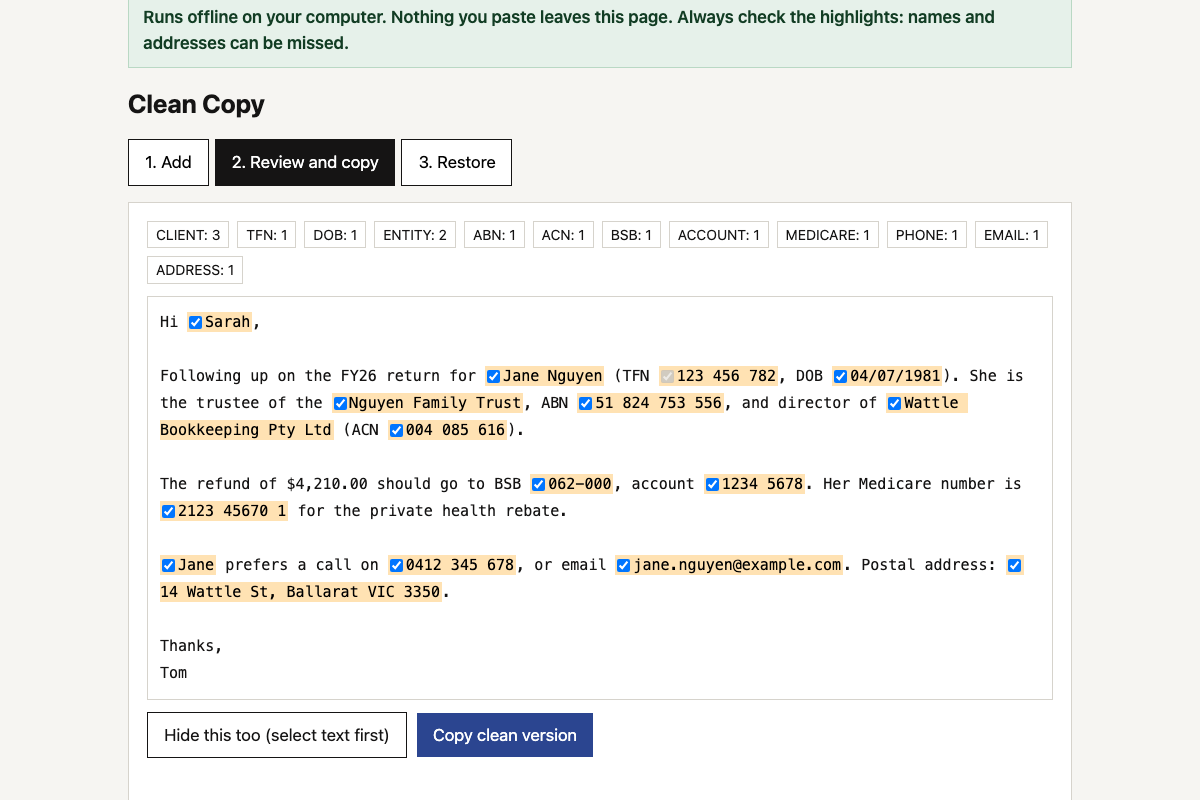 Client data redaction toolHides TFNs, ABNs, bank details, names and addresses before you use AI on client work, then puts the real details back into the answer.
-
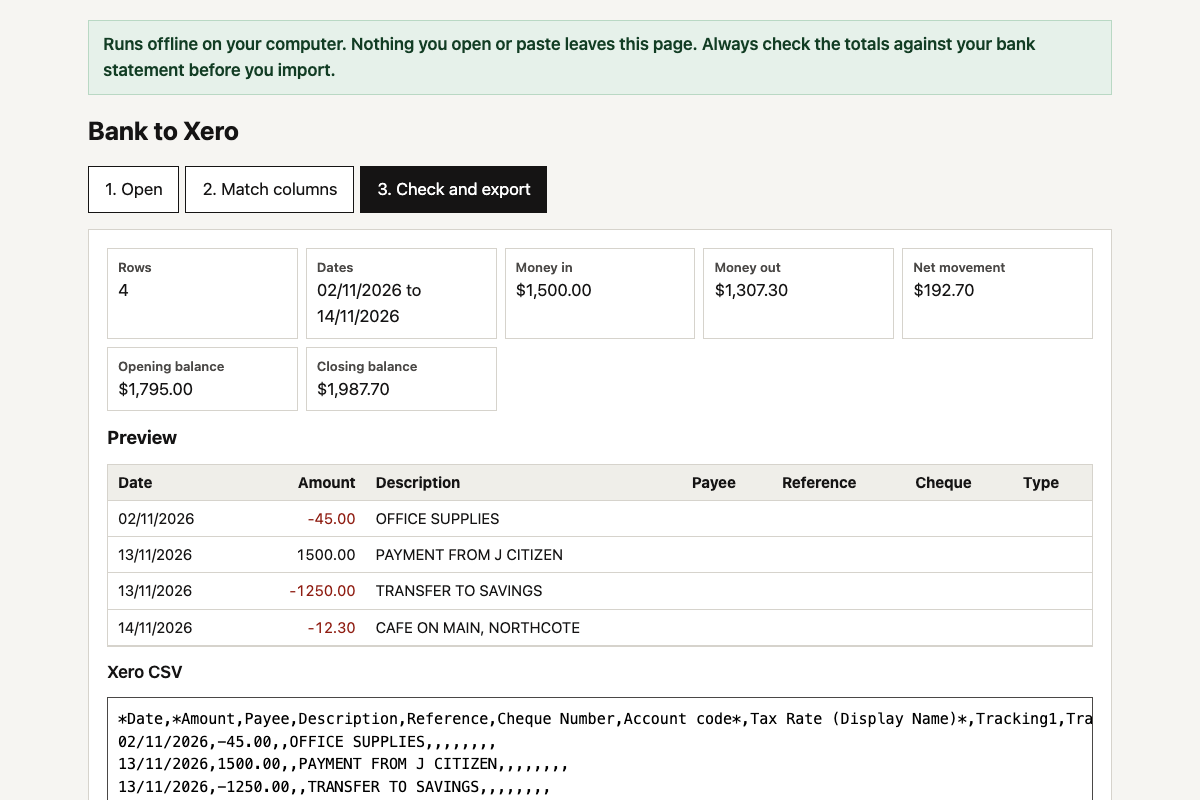 Bank CSV to Xero converterTurns a CSV from any Australian bank’s internet banking into Xero’s bank statement import format, with the dates, signs and columns fixed.
-
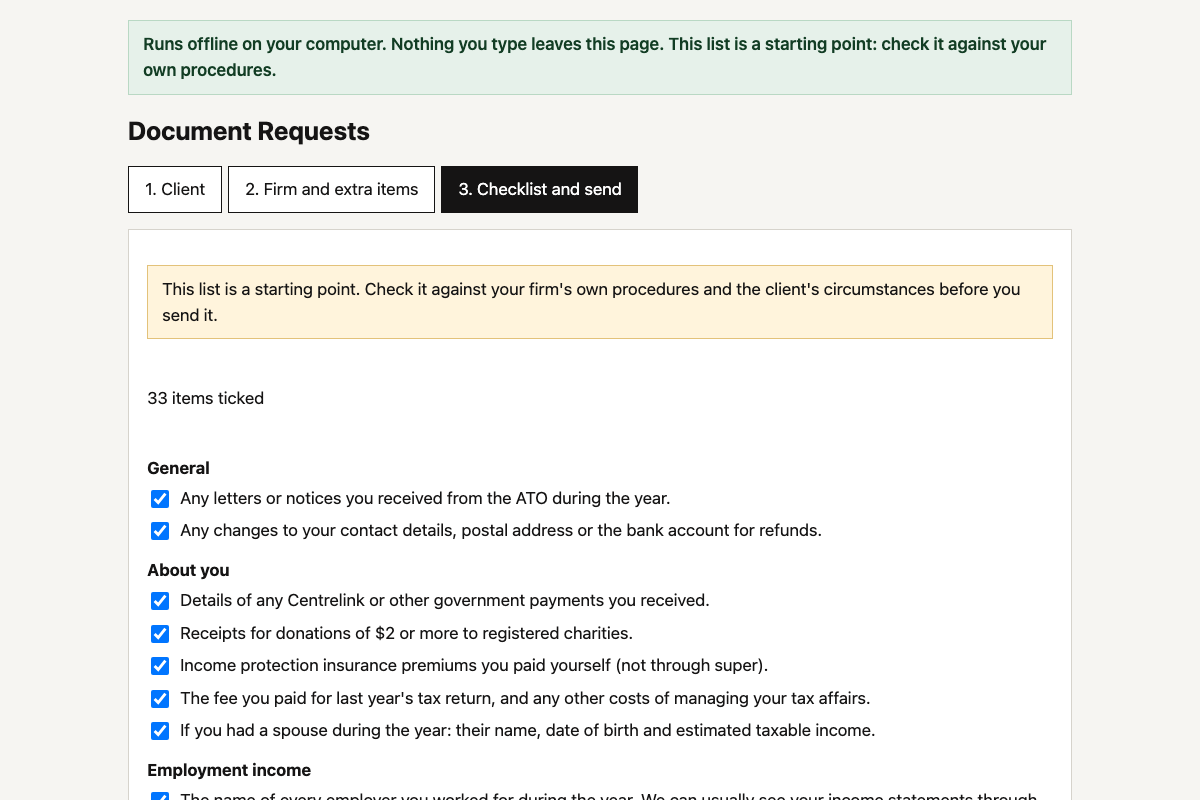 Client document request builderPick the client type and what applies, and get a tailored list of what to send you for this year’s tax return, as a ready-to-send email.