How to get your firm ready for agents in 2027
AI agents can now do multi-step work in an accounting firm, but only on information they can read, and most of what a firm knows is lost in conversations. Trent McLaren’s LYD 2.0 talk sets out four setups to fix that, in order, starting Monday.

Trent McLaren · Publisher, The Firm
25 November 2026 · 11 min read

Part of our AI in accounting coverage. See the full AI for accountants guide →
On 25 November 2026 I stood up in front of a room of accounting firm owners at LYD 2.0 on the Gold Coast and talked about AI agents for half an hour. The thing people kept saying to me afterwards wasn’t about any one tool. It was some version of “that’s the first time agents have made sense to me.”
That stuck with me. The people in that room aren’t behind. They’re busy, and two years of AI hype has rarely told them what to do on Monday. So this is the talk written down, with the key slides redrawn. If you want your firm ready for agents in 2027, this is what I’d do, in order.
Agents are already here, and they climbed fast
I’ve spent fourteen years inside accounting technology, from Intuit’s move to the cloud to being employee 19 at Ignition. I’ve never seen anything move like this. In 2023 AI was a chat window. By 2026 it does multi-step work on your files while you review it.
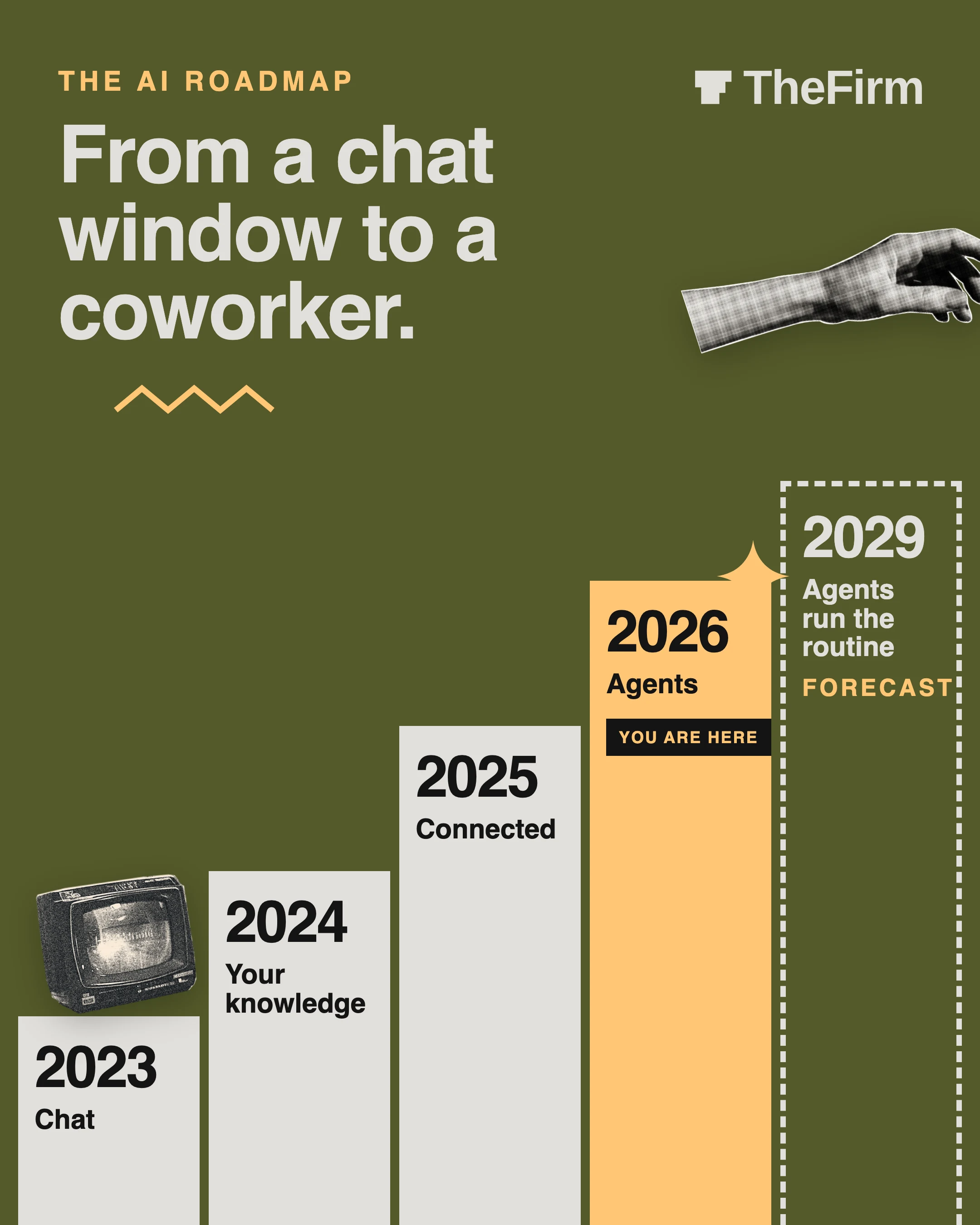
That last step is the one that matters. An agent is software that takes a request, looks things up in your systems, does several steps of work and hands you a draft to approve. In a firm, that looks like this:
- Meeting prepwhat the client said last time, what you promised, what has changed.
- Chasing documentsworks out what’s missing and asks the client once.
- Inbox triagesorts what came in by client and urgency, and routes it.
- Follow-upsdrafts the email and the task after a meeting, for someone to check.
My one forecast is the dashed step: by 2029, agents run most routine work in a well set-up firm. The first firms there will be the ones whose information is ready.
Every firm I talk to has the same problem in a different shirt
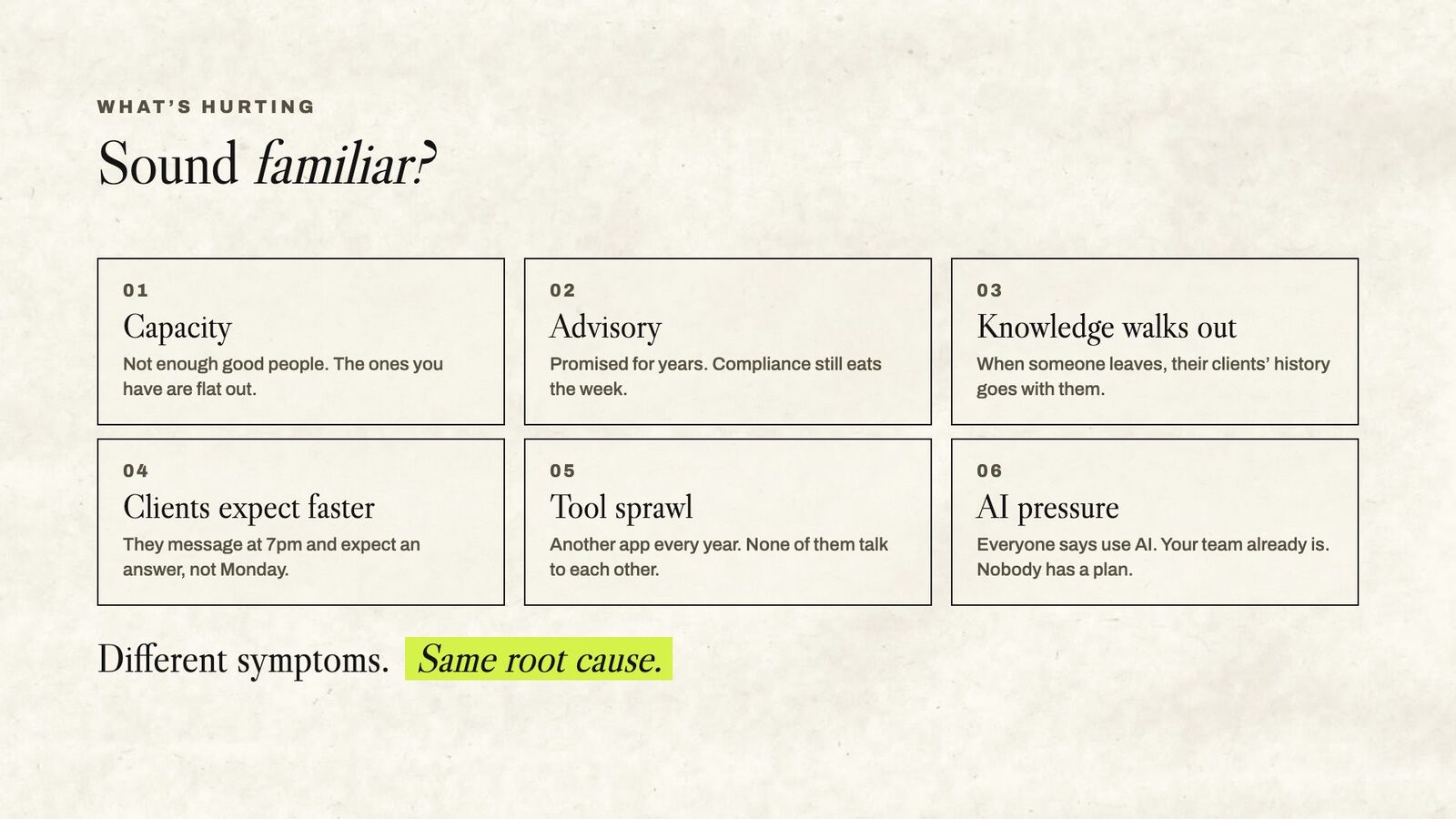
Capacity, advisory that never quite happens, knowledge that leaves with people, clients who want an answer at 7pm. Different symptoms. Same root cause: the firm doesn’t hear itself.
Think about where your firm’s real knowledge lives. What a client told you about selling the business. Which client hates email. It’s in meetings, calls and texts, and most of it is never written down where a new staff member could find it, let alone an AI. An agent can only act on what it can read. Right now it can’t read most of what your firm knows.
You won’t type to it. It will hear you.
Today you type, you hit enter and the AI answers. It waits to be asked, and it only knows what you remember to tell it. That’s the ceiling most firms are bumping into.
The next step is what I call a Voice OS: AI that listens to the meeting, the call and the email thread, understands what was said, and acts on it. It’s the idea Vinyl is built on for accounting firms: every conversation becomes an instruction, but only if it’s captured. That’s why capture comes first in the setups below.
Your firm knows two kinds of things
When I break down what a firm knows, it splits in two, and the halves live in different places. Client intelligence is what you know about each client: their goals, what they’ve told you, what you’ve promised and what has changed. Team intelligence is how the firm works: who knows what, your processes, your decisions, what you’ve learned the hard way.
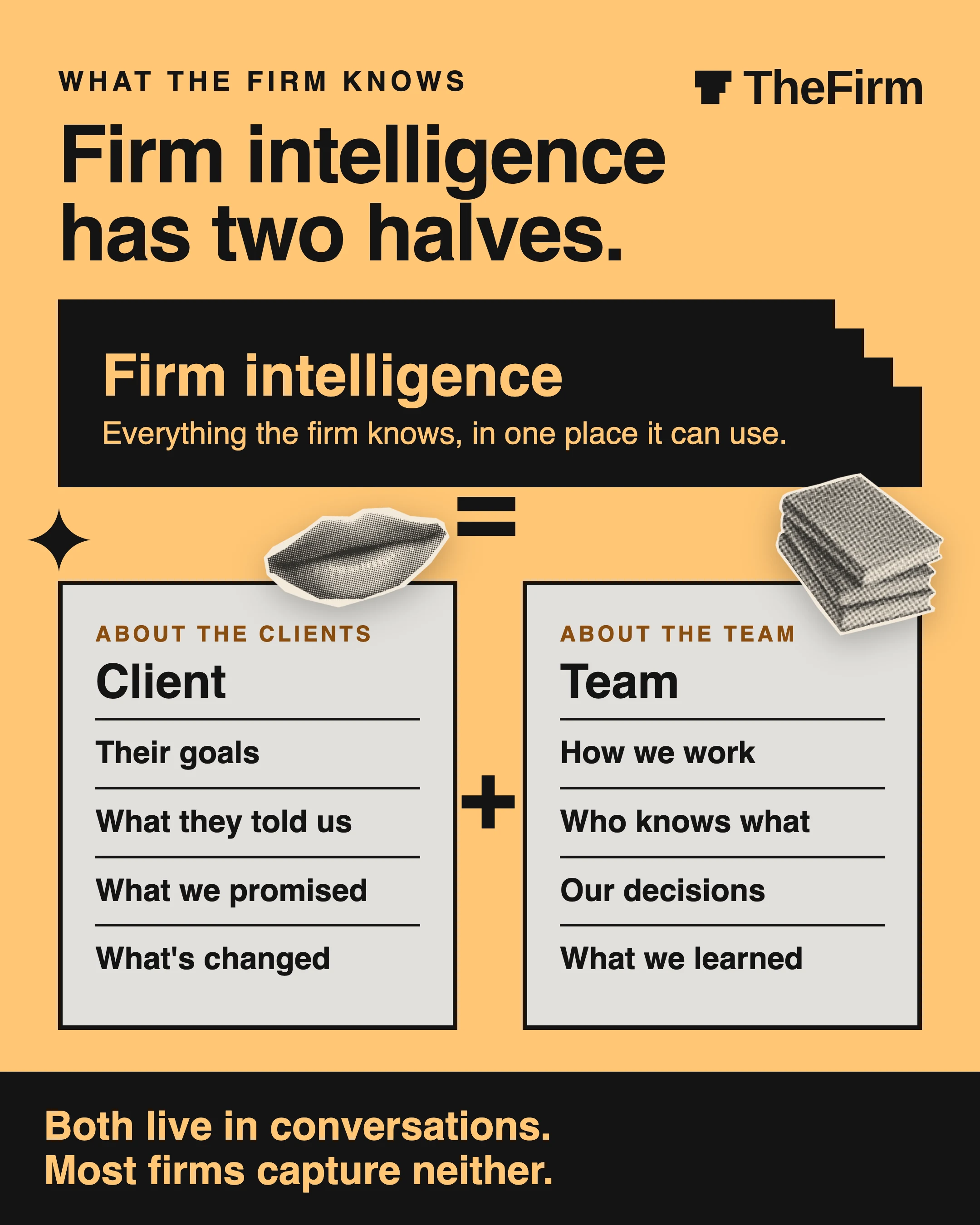
Your people are the first brain. They remember some of it, and one day they leave. The firm needs a second brain that keeps all of it and answers anyone, any time: a memory your people share.
Not the firm with the most AI. The one that finally hears itself.
What it looks like when a firm hears itself
Here’s the example I walked the room through. A client texts at 7:42pm: they’re thinking about buying the building next door. It’s captured by Vinyl in the same stream as their calls, emails and meetings, and the client record shows three earlier property conversations and the family trust. A triage step, an agent sorting what came in by urgency, flags an advisory opportunity. A task lands in practice management, a reply is drafted, and at 7:43pm the advisor is flagged to call first thing. Nobody had to notice it.
The work still ends with a person. What changed is everything in between. Today your people carry information between systems, and every handoff is a wait. With agents, they move up to the judgement calls.
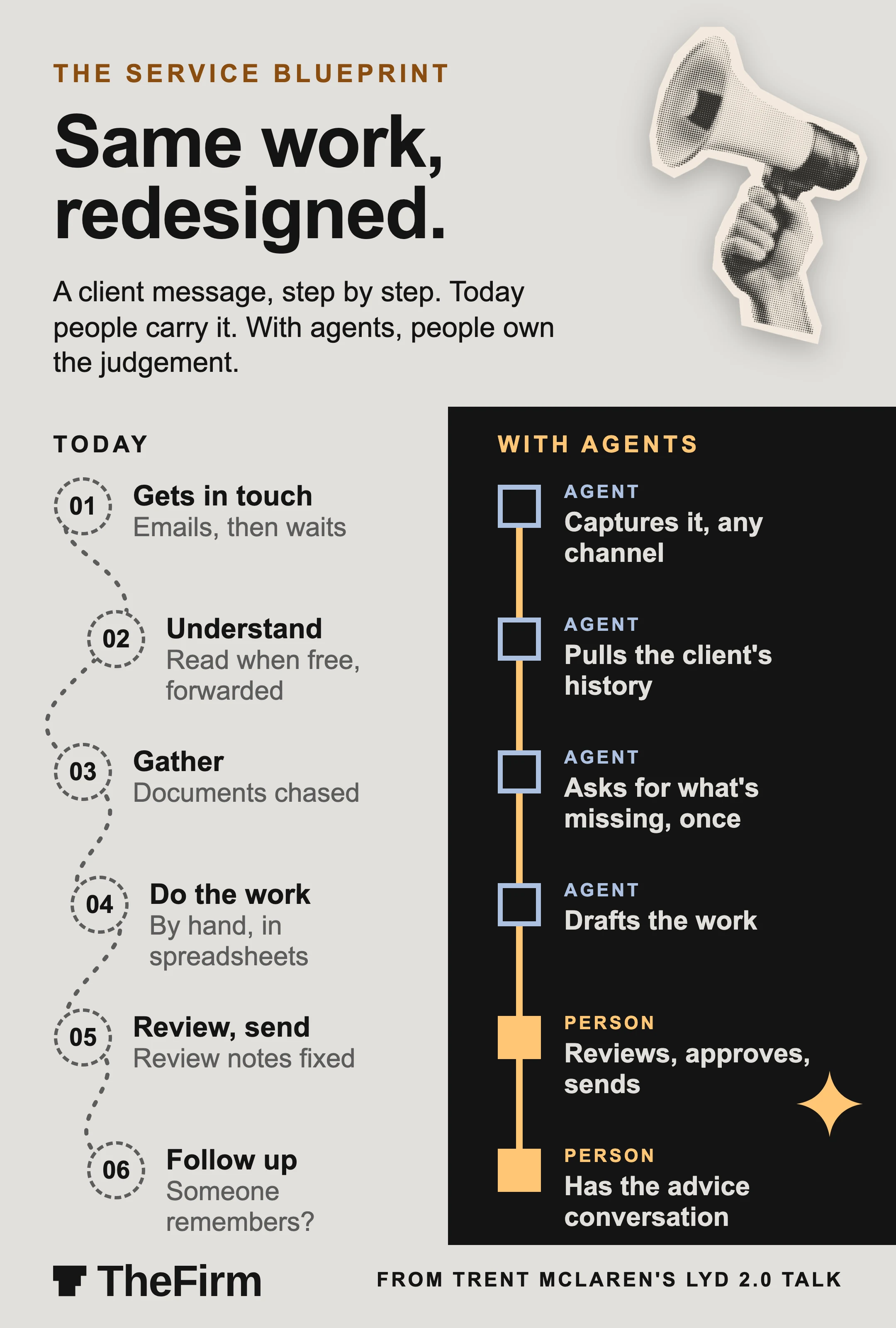
You can’t bolt agents onto the way you work today. You redesign the work around them, one journey at a time.
Four setups, in the order I’d do them
1. Alignment: decide the frame, then open it up
Your team is using AI whether you’ve approved it or not. Run a one-week amnesty survey: what AI, for what, with what client data. Promise nobody gets in trouble; you’re finding demand, not culprits. Our guide to finding the AI your team already uses has the questions.
Then pick the core: one AI on a business plan with training off, practice management as the spine, one home for documents. Write one page of rules (our AI policy template for accounting firms gets you most of the way) and name an AI lead with two protected hours a week.
This week: send the survey on Monday.
2. Capture every conversation, starting with one meeting type
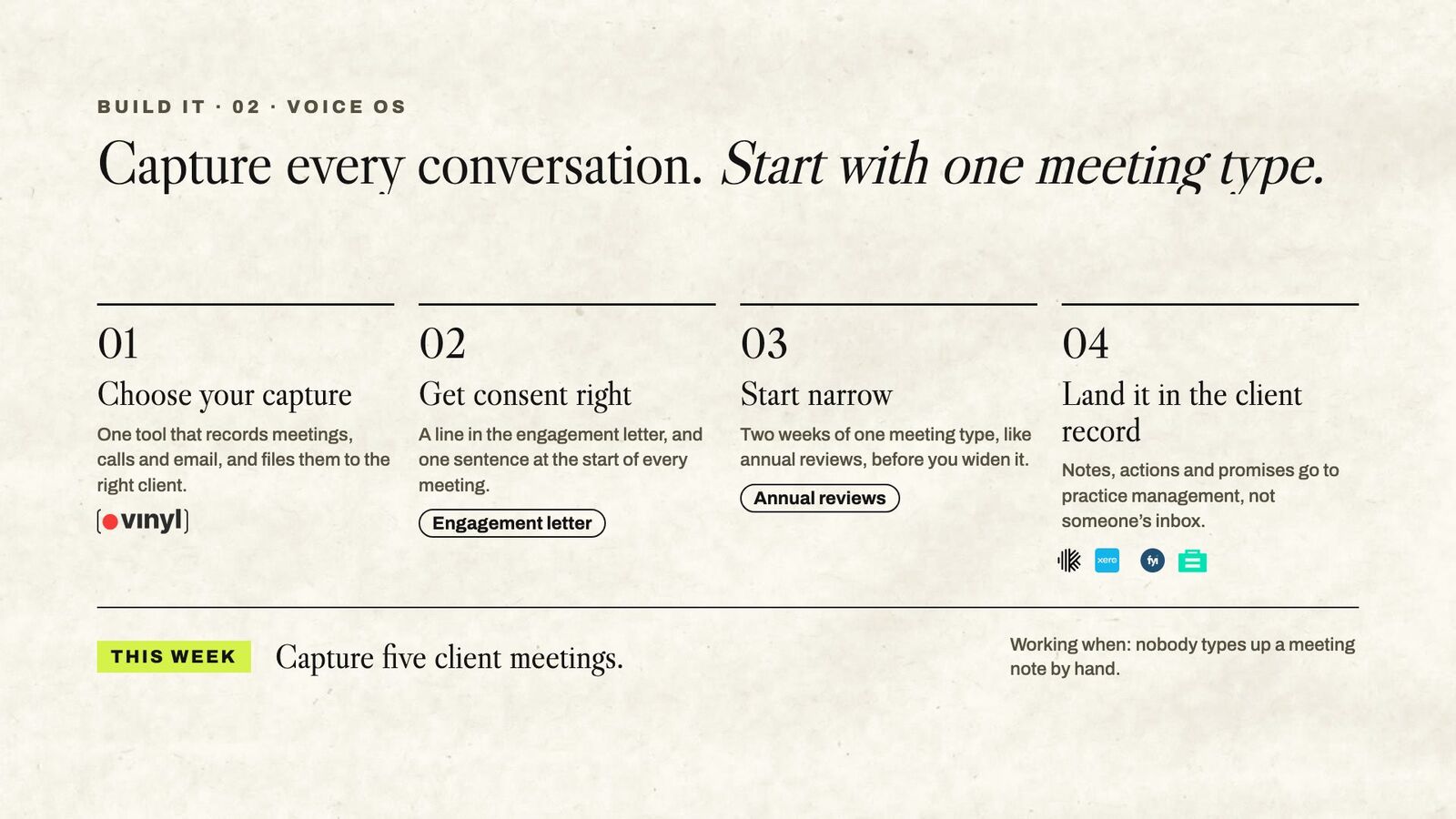
Pick one capture tool that records meetings, calls and email and files them to the right client. Tools built for accounting firms, such as Vinyl, do this, and the principle is the same whichever you choose.
Get consent right: a line in your engagement letter, and one sentence at the start of every meeting, “we record our meetings so nothing you tell us gets lost.” Recording laws differ between states and countries, and some need every party’s consent, so a clear yes is the safe default. Our piece on recording in-person client meetings has the detail.
Start narrow, with two weeks of annual reviews, and land the output in the client record, not someone’s inbox.
This week: capture five client meetings.
3. Build the second brain, starting with your top 20 clients
The second brain isn’t a new app. It’s a structure: one record per client, with the same five headings for everyone, so AI can read it and anyone can find it. Our step-by-step guide to building a second brain for your firm goes deeper.
| Heading | Example (illustrative client) | Where it comes from |
|---|---|---|
| Who they are | Two companies and a family trust | Practice management |
| What they’ve told us | Buying the building next door | Meetings and calls |
| What we’ve promised | Structure advice before they sign | Meetings and email |
| What’s changed | The bank wants numbers by Friday | Email and documents |
| How they like to work | Texts, not email, early mornings | Your team |
The test I give people: could a new team member run this client’s next meeting from this page? If yes, you’ve got a second brain.
Keep it to two homes, not five. Client knowledge lives on the client record in practice management, whether that’s FYI, Xero Practice Manager (XPM), AccountKit or Karbon. Team knowledge lives in a wiki: SharePoint or Loop on Microsoft 365, Notion if not. Never copy client data into the wiki.
Fill it automatically where you can: a capture tool like Vinyl files what was said and promised against the client, and where it doesn’t connect to your practice management, someone pastes the summary in. Either way, a person checks it weekly.
Then connect your AI to it, read-only. A connector is the link that lets an AI read a system like practice management; read-only means it can look but not change anything (our checklist for connecting AI safely covers it). Now before every meeting you can ask: what did we promise, and what has changed?
This week: set up the five headings for your top 20 clients.
4. Redesign one journey, then the next
Pick one weekly journey, like the annual review. Get the team in a room for an hour and map it, marking every wait and handoff. For each step, ask: can it be captured, drafted or checked automatically, and what stays human? Name who reviews, run it for 30 days and measure turnaround.
This week: book the one-hour mapping session.
“Is it safe?” is the wrong question
Every room asks it. A power saw is safe until someone takes the guard off. What matters is whether it’s set up safely.
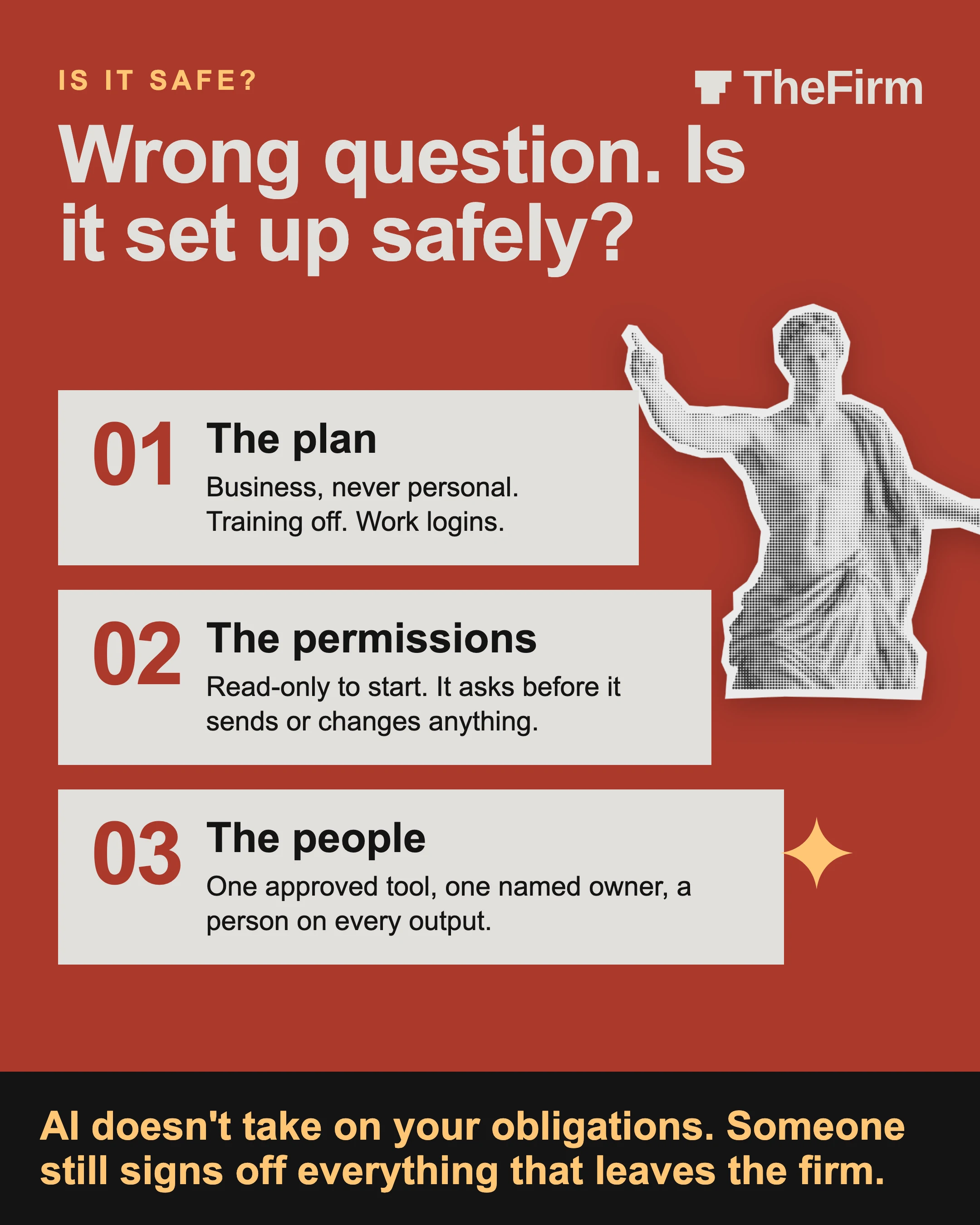
- The planBusiness, never personal. Free and personal AI plans can train on what you type unless someone switches it off. OpenAI says it doesn’t use ChatGPT Business or Enterprise data for training by default, and Microsoft says Microsoft 365 Copilot prompts and responses aren’t used to train its foundation models (both as at November 2026). If a manager pays for a personal plan on their own card, your client data walks out when they do. Our guide to privacy settings in ChatGPT, Claude, Copilot and Gemini walks through each.
- The permissionsRead-only to start. The AI drafts the email; it asks before it sends it.
- The peopleOne approved tool, one named owner, a person on every output.
AI doesn’t go to jail for you. For Australian tax and BAS agents, the Tax Practitioners Board’s guidance statement on AI and the Code, TPB(GS) 55/2026, is clear that the practitioner stays responsible for their services and for checking what AI produces. We covered it in AI is now a Code obligation for every tax practitioner. In the US, the IRS Office of Professional Responsibility published guidelines on responsible AI use in federal tax practice in 2026 that take the same line.
One date for Australian firms: from 10 December 2026, organisations covered by the Privacy Act must say in their privacy policy where computer programs make, or substantially help make, decisions about individuals using personal information. Many small firms are exempt (generally turnover of $3 million or less, with exceptions), so check first. If you’re covered and agents touch client decisions, update your privacy policy and engagement letter. The OAIC’s guidance is the source of truth; this is journalism, not legal advice.
Start Monday: four weeks, four setups
Step by step
- Week 1Align. Starting Monday, send the amnesty survey and pick one AI on a business plan, training off. Done looks like: Everyone knows which tool to use and what can go in it.
- Week 2Capture. Record five client meetings, with the consent line in the engagement letter. Done looks like: Nobody types up a meeting note by hand.
- Week 3Second brain. Five headings for your top 20 clients, and connect your AI read-only. Done looks like: Meeting prep takes five minutes, not fifty.
- Week 4Redesign. Map one journey with the team and write one process down as a skill: step-by-step instructions your AI follows the same way every time. Done looks like: Turnaround drops and nobody chases the same thing twice.
The goal for now: capture everything, then expose it to your AI. The gap between firms isn’t knowledge any more. It’s a decision. Draw the line, start imperfectly, and build from there. Our guide to AI for accounting firms is the place to go next.
Where we could be wrong
The 2029 forecast is mine, and AI timelines have been wrong in both directions. The bigger risk is the tools: the AI layer changes often, practice management rarely. So keep your data in your own systems and review your AI choice every six months, and check your own plan’s data terms rather than our summary.
Frequently asked questions
Do we need to buy new software to get ready for agents?
Mostly no: the practice management system you run, a wiki and one AI on a business plan. Most firms add a capture tool, because conversations hold what’s missing.
Which AI should a firm choose for 2027?
The one that fits your systems, such as Microsoft 365 Copilot if you live in Microsoft 365. Keeping client data in your own systems matters more, so you can switch later.
How long does this take for a small firm?
Four weeks to start, one setup a week. Then the second brain grows from your top 20 clients outwards.
Should clients be told their meetings are recorded?
Yes, in the engagement letter and at the start of each meeting. Telling them up front is also what makes them comfortable sharing detail.
Who in the firm should own AI?
One named person with protected time, who owns the tool and the one-page rules. It needn’t be a partner, but a partner has to back them.
Sponsored

AI agentsAIPractice managementLYD 2.0
Get the editable AI policy template Download the AI policy template
The Word document (.docx), ready to fill in. Your profile unlocks every template on The Firm.
Or build it with AI
Open Claude or ChatGPT with the prompt filled in. It writes the finished document for your firm straight away, then asks a few questions to tailor it. No client data needed.
Works without client data. Don't paste client names, tax file numbers or ledgers into an AI tool your firm hasn't approved for them. AI data safety playbook.


