“It's probably twenty clicks to create a proposal, not exaggerating too much. Then doing it in Claude, it was one prompt.”
Ben Walker, founder of Brisbane-based Inspire Accountants, walks through the newly released Ignition MCP and how he pairs it with Claude and Vinyl to automate proposal work. Having been one of the first people to trial the MCP, he frames it as a native, non-developer-friendly connector that lets the AI read and act across systems inside a single context window — collapsing a roughly twenty-click manual proposal in Ignition into a single prompt.
The session is built around four concrete use cases: applying conditional price increases at end of financial year (with the caveat that Ignition’s native renewals are safer for blanket increases); bulk-updating engagement terms across 300-plus proposals to cover incoming AML rules and AI-use clauses; reconstructing a retrospective back-charge from a chat export and email thread; and drafting a full proposal from a Vinyl meeting transcript. A live demo shows Claude reading a transcript, finding the client, creating services and producing a draft six-month proposal at $9,750/month in three to four minutes.
A recurring practical theme is cost and control. Ben burned 60% of his Claude usage running a bulk job in Opus, and recommends developing prompts in Opus but executing bulk work in cheaper, faster Haiku. He stresses human-in-the-loop review, since the MCP leaves proposals as drafts, and outlines his data-safety setup (team plan, model training off, redaction). Trent positions Claude as the glue between otherwise disconnected tools — analogous to Zapier, which still earns its place for trigger-based workflows.
The talk closes on Vinyl’s roadmap: email integration, the Vinyl-to-Ignition integration, and calendar scheduling — together enabling a book-meet-propose-email-get-paid workflow across all Vinyl tiers.
Key lessons
- The Ignition MCP lets Claude create, reprice and update proposals in minutes — collapsing a ~20-click manual proposal into a single prompt.
- Use Ignition's native renewals for blanket increases; reach for the MCP when you need conditional or custom-logic price increases (e.g. Xero subscriptions priced differently).
- Manage model cost: develop the prompt in Opus, then run bulk jobs in a cheaper model like Haiku — Ben burned 60% of his Claude usage running ~300 proposals in Opus.
- Always keep a human in the loop — the MCP leaves proposals as drafts so you can sense-check before sending to clients.
- Treat Claude as the glue between disconnected tools (Vinyl, Ignition, Karbon), much like Zapier — while Zapier still wins for trigger-based automations.
- Protect client data with a team plan, model-training turned off, and redaction of highly sensitive details before uploading.
Tools mentioned
Resources & links
- 04:34 “It's probably twenty clicks to create a proposal, not exaggerating too much. Then doing it in Claude, it was one prompt.”
- 20:32 “In about three minutes I'd used sixty percent of my Claude usage running the remaining proposals.”
- 33:30 “Claude becomes the glue between a bunch of systems that aren't naturally all speaking to each other. And it does it without having to log in to each system.”
- 36:27 “Think about this as the assistant you've delegated a job to, who's brought you back a draft that you then review.”
 , the AI meeting assistant for
accountants.
, the AI meeting assistant for
accountants. Ben Walker — Founder & Director, Inspire Accountants
04:34Meet Ben Walker and the AI shift in practice
I run an accounting firm called Inspire Accountants based in Brisbane, Australia. Between the Brisbane office and the team in the Philippines, we’ve got about thirty-five in the team, and I’ve been running that since 2013, so quite a few years now. Probably the last twelve months I’ve been focusing on how do we leverage AI, and even for the past four or five months I’ve been teaching other accountants how to implement some pretty cool things to leverage what they do — take pressure off the team, given a lot of us are already very much at capacity.
What I’ve noticed is that three months seems like a year with AI development. It’s crazy. If we roll back to a year ago, we weren’t talking about things like MCPs, particularly not with Ignition or the software we use day to day. Some of the big companies like Microsoft or Slack obviously had APIs we could connect to, but what’s great is seeing some of these smaller software providers that we use day to day coming out with these tools that link in with the AI we use every day.
I was stoked when the MCP got announced and released from Ignition about a month ago. That day I had to play with it, and that week I reckon I used the MCP three or four times to help me do whatever I was trying to do in Ignition. I was somehow the first person that ever got to use the MCP — I was very fortunate. I was in Arizona for an event, sitting next to the product manager who was managing the MCP, and he said, “Do you want to give it a go?” I was like, “Yes, absolutely.” I have an Ignition account, so I was able to do that.
I was blown away. When I create a proposal in Ignition, it’s a lot of clicks. You’ve got to get in, create the proposal, add the person, choose the expiry, how long it’s for, what’s the service, amend the service. It’s probably twenty clicks to create a proposal, not exaggerating too much. Then doing it in Claude, it was one prompt — “Hey, I need you to review a proposal based on this meeting, can you do all that for me?” And in two minutes I had a branded proposal, structured, even with the add-ons that I probably wouldn’t have done, laid out as a nice structured piece.
08:27An early win: a retrospective back-charge from WhatsApp
One example from the first week or two: I had a client ask me for a bill, and I wasn’t really intending to charge him. It was just a couple of phone calls. So I connected my Claude to my email account, it looked for the emails, and then I exported my WhatsApp chat with him — he’s a mate and a client. Claude analysed the conversations and back-and-forth, and we talked about an estimate of how long that would have taken to work together, then pushed that into an Ignition proposal. So custom description and everything, almost like a retrospective timesheet within the service description. I keep finding a new way to use it that I hadn’t thought of before. There are a couple of limitations, but for eighty percent of what I want it to do, it’s a gem.
09:11Use case 1 — repricing proposals with a conditional increase
Every financial year in Australia, June is the end of the financial year, and what we want to be doing is renewing and applying a price increase to our services for all of our clients. Now, Ignition has a native renewals feature, and I actually wouldn’t recommend the MCP for a straight bulk increase. If you’re bulk-applying a set percent for every service that already exists, use the Ignition renewals feature — that’s a bit of a safer approach, and you don’t need AI like Claude separately to run that.
But if you wanted to apply custom instructions to your price increase — for example, certain services like Xero subscriptions aren’t necessarily going up by seven and a half percent — then conditional price increases are where this MCP would be pretty cool. If we’re renewing a proposal that’s got Xero in it, we want to be referencing our service library price, which will be the price effective from 1 July.
So I prepared a prompt to increase a proposal, referencing the MCP, and I gave it the client slug. It’s my own entity, in case it slips and lets out the entity name, but I wanted to show it can keep its mouth shut about the details. I asked it to apply a seven and a half percent increase, and it went through the MCP into Ignition. It found there were already three proposals for this client and a draft already existed from the manual renewal run, so it got a bit confused.
This is the important part: when you do it in Claude, you’ll see it’s thinking, with that little Ignition logo in there. Depending on your prompt, it’ll tell you what it wants to do before it goes and does it. Think about how long this would have taken to do manually. I don’t think I’d do this exact use case day to day, but if I wanted to reprice all my SMSFs — self-managed super funds — I could create a prompt that does that really well, and it might run on ten, twenty, thirty funds. That’s where you get the benefit of that bulk work. Conditional price increases will be perfect for the MCP, whereas it’ll be really fiddly with the internal repricing tool if you’re not just applying a blanket increase.
To direct it, I dictate what I want — this is how I interact with Claude most of the time. I told it: “I don’t want you to scrap the current one and do another renew. I just want you to create a new proposal. I’m doing a demo in a workshop. The price to apply — can you please apply a seven and a half percent increase rounded up to the nearest dollar per service line?” That’s why it’s not exactly seven and a half percent for each service. It validated everything, applied the monthly amount, and the client ended up with two draft proposals, exactly as asked — it left them as draft and didn’t send. If this was a live client, I’d manually check everything. The idea is human in the loop, not leaving AI to do its thing with everything before sending to a client.
13:49What an MCP actually is
It’s a really good question and a weird, funny acronym. Basically it’s a connector between your Claude — or whatever AI LLM you use, whether it’s Claude or ChatGPT — and the software you’re trying to connect to. It’s a lot more native than my understanding of APIs, where you need API keys and all that stuff. It’s a quick and neat way for a non-developer to connect the two pieces of software.
The way I always talk about it: if an API is me connecting to one part on a single pathway that can only do one thing, the MCP lets the AI connect to the system, and whatever it’s been given access to it can pull into its context window, and then the AI can go and take action somewhere else on the other side.
We’re actually building the Vinyl integration using the Ignition MCP rather than through an API, for a few reasons. When you click the button in Vinyl that says “draft a proposal in Ignition,” it looks at the meeting transcript in Vinyl, pulls the service library and pricing from Ignition so it’s all in the same context window, and then produces a new scope of work you can review before deciding whether to create it as a proposal. That’s all done through the MCP — the MCP is just the AI’s way of getting around all that information across those accounts inside one context window.
20:32Use case 2 — bulk-updating engagement terms across 300+ proposals
A couple of days after I got access, I’d already done my renewals using the renewal feature — a seven and a half percent increase rounded up to the nearest dollar across all our services. But there were a couple of reasons I wanted to update the engagement terms in my proposals. One in Australia is AML, which is coming out on 1 July, and I hadn’t updated our engagement letter for that. The other is the use of AI — I feel like that’s a fair thing we need to be putting in our engagement letters, being clear with our clients. The current engagement letter on those 300-plus proposals I’d already renewed did not have those updated terms.
Before the MCP, that would have been a couple of thousand clicks easy. You’d go into every single proposal — because I’d updated the default terms, I’d have to change each one to another random engagement term and then change it back to refresh it in the proposal. So with the MCP, I first got it to check it could actually do the function of changing terms in draft proposals, and it came back positive. Then I batch-tested it: “Can you do one or two first? Change it to something else and then change it back.” I’d go into Ignition and check it was pulling up the new engagement terms. Once that passed, we could run it live with the remaining 330 or so.
Here’s the catch: in about three minutes I’d used sixty percent of my Claude usage running the remaining proposals. My understanding of why is the token usage for each request, combined with using Opus — one of Claude’s more intelligent and more expensive models. I didn’t think twice; I’m on a pretty high package, so I just gave it a roll, and I burned through my usage. So I worked out that if I get the prompt ready in Opus — the thinking around what I’m trying to do — and then run it in a cheaper model, in my case Haiku, I could run the balance of the engagement-term changes in a more token-efficient way.
There are three main models Claude makes available — Opus, Sonnet, and Haiku. Haiku is the fastest for quick answers and generally the cheapest to run. In the desktop app there’s also a dropdown for effort: low, medium, high, or max. Low effort is generally cheaper because it uses fewer tokens. Opus is what people use for coding, where you want it to understand all the files it’s coding for. In this scenario Ben got the whole job done across 300 proposals using Haiku — cheaper and faster, definitely not as smart.
On whether the proposals are personalised: we use the same service lines in Ignition and don’t modify the price per service line, so we can run things like bulk renewals. Obviously a client with two companies, three trusts and two individuals is a different makeup from one individual and a simple trust, so we customise per client for entities, and we’ve got different base prices too, which makes renewals so quick now. We did the pain a couple of years ago of changing to that model, and now it’s so much better.
End to end, the engagement-terms refresh was a once-off. I’m pretty sure it took a couple of hours start to finish, but maybe twenty minutes of my actual attention — I just kept an eye on it and let it run in the background once the bulk was underway. The old way would have been two to three thousand clicks, or deleting all the renewals and renewing everyone again, which gets messy in your Ignition account. I couldn’t imagine doing it the old way.
One thing that surprised me is the MCP had the ability to change the terms — that’s a pretty niche setting. There are limitations: once a proposal is drafted, it can’t change the description of a service in an existing proposal, but it can create a custom service description in a draft proposal. So go figure.
28:14Use case 3 — Vinyl transcript to an Ignition proposal
This is the fun story for everyone listening, because it’s how we came up with the idea to build Vinyl in the first place. Going back two-and-a-bit years, I was using Fireflies in our agency. I’d take the transcript out of Fireflies, put it into ChatGPT, ask it to draft a new scope of work and proposal, put that in a Google Doc, get it verbally committed, then go to Ignition and draft the proposal to send and sign off. The original idea, before we could AI-code things, was: what if we could build the notetaker that was purpose-built for accounting, that would understand all the context and integrate with all of our systems?
The exciting part is we’re now at a point where we can integrate Vinyl directly to Ignition. By mid-June you’ll be able to have a meeting that’s been recorded, summarised and processed, click a button that drafts the proposal based on the transcript and summary, against your services and pricing in Ignition. You review it all in Vinyl, and if you’re happy you can either raise it as a draft in Ignition to review, or send it — it’s the same experience Ben just showed in Claude.
For the demo, I got Claude to create a demo Vinyl transcript. Vinyl lets you download a JSON file that’s a transcript of your meeting with notes of who said what. The scenario was a sales call with a prospective client, and the task was to find the client in Ignition and create a draft proposal off the back of it. Internal language at Inspire is “LUTH” — look under the hood — a second opinion on someone’s tax, a very common next step after an initial sales call. When the Vinyl-to-Ignition connection comes out it should be even quicker — in this demo I downloaded something from Vinyl, uploaded it, and added a prompt, but it should be just a click or two.
That’s how we think about all the buttons: all the thinking you’re doing here, we try to do behind the buttons. Rather than you writing it out, we’ve already told it “you’re an accounting firm, these are your services, this is what you should be listening for.” I did this in Vinyl today for finding new revenue opportunities — you’ll be able to click the button and get a table of services you should be selling with a confidence rating that says “the client said this, this is why we have a confidence rating of 95 out of 100.”
33:30Claude as the glue between disconnected systems
I think about Claude as the middleman. For everyone who’s been on the sessions all day, this is not too different to how we used Zapier five to ten years ago — couldn’t do something in one product, so I used Zapier to trigger it into something else. I’m now using Claude to do the same thing. Think about all the things I’ve done in Vinyl that I bring to Claude to do in Ignition, that I might then want to update into Karbon. Claude becomes the glue between a bunch of systems that aren’t naturally all speaking to each other. And it does it without having to log in to each system.
On a question about prospect data: if it’s in Vinyl, it’s because it’s in your calendar — there’s an email, a contact, you’ve had the meeting. If we then create it in Ignition, we’d create the contact as part of the proposal. Through the MCP you can create a new contact, and we’re working through that on the Vinyl side now.
On keeping client data safe through Claude: a couple of things. It’s the subscription type — we’ve got a team plan, and we’ve turned off anything that trains the AI models. There’s even location data you can control. I put a fair bit of effort into making sure what we upload is secure, and we redact anything extremely sensitive.
36:27Live demo — building a proposal from a meeting transcript
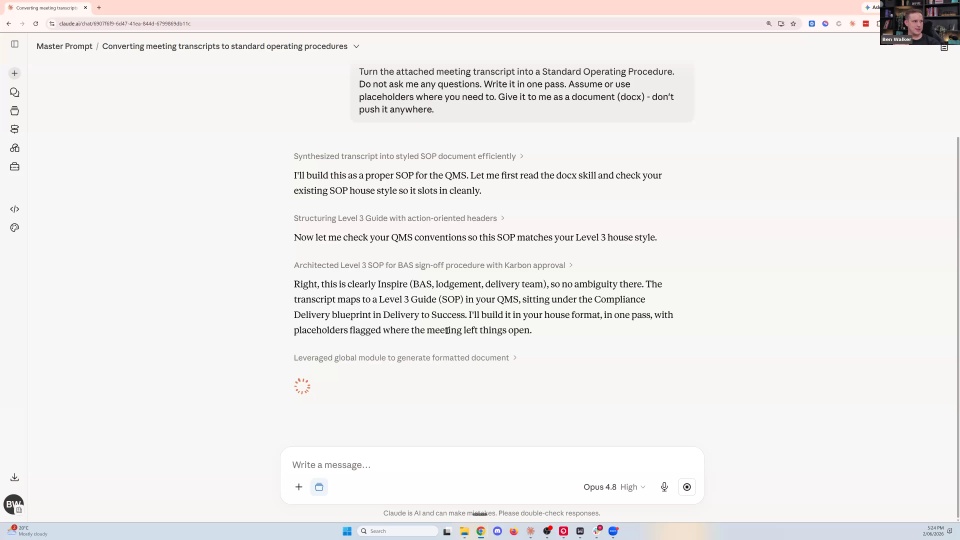
Here’s the live version. My screen is Claude, and I’ve pasted in a transcript from a meeting as my dummy — it’s not a full discovery call, but it should do the job. Using WhisperFlow, the prompt is: “Look at this meeting transcript to identify the services we could be offering to this client, and then create a draft version of this proposal in Ignition for me to review.” Because I’m doing it in Claude, this could also have been an email — the transcript plus the email plus the WhatsApp, whatever — it all comes through.
You can see it’s pulling a skill I created for my Ignition MCP, then it starts the work: first it looks at the services and templates available in Ignition, checks the available clients and services, then looks up the client. This is the same experience you’ll see in your Vinyl chat once you’ve clicked the button. It already sees a case study service exists, finds the client — this client was already in our system, but if it wasn’t it would try to create it. When it flickers between the different things, “always allow” — that’s how fast it’s moving through the data in the Ignition account.
It picks the best template, then drafts its recommendation, going through each bit one by one. A lot of people say “Trent, I could do this faster than Claude.” Maybe you could. My workflow is to delegate and then move on to my next task, then come back to it — it’s not normally that I’d sit here live watching it. It created three services, then created the proposal at $9,750 a month, added the services to the service group — all done, live.
Let’s look at what was created. Here’s the draft proposal: give it a name, put in the person, set it as acceptance, fixed six-month term, the three services we created, with service descriptions added and prices associated. Payments are all turned on and terms are all in, because that’s part of my template. The presentation message has been crafted — you can tell it’s a Claude message because it’s all em dashes. It took three or four minutes, based on a transcript conversation, added services where needed, and found the existing client. Think about this as the assistant you’ve delegated a job to, who’s brought you back a draft that you then review.
On whether it fills your services with junk: it does if you let it. You could say “don’t create new services,” particularly if you’re using a practice-management system where services are tied to work templates — for example in Karbon, where work templates are tied to the services you’ve created, you wouldn’t want it creating new services. But if you said “look at all my meetings, look at all my services, are there any services missing?” it can be really helpful, because you might be missing services you should have, and the AI helps suggest them. You then need to map them to Karbon or FYI — I think FYI just went live with Ignition last week.
42:30Where Zapier still fits versus Claude
Zapier still has a place — I still use it. I find Zapier is a trigger. I use Zapier with Vinyl: when a meeting finishes, Vinyl sends an email, and Zapier says “whenever I get a Vinyl email, push this into Slack,” dividing it into different channels so the rest of the team get notified. So Zapier is really good for trigger-based activities. When we get a new review on the Xero app store, I get an email, and Zapier — using Claude inside the Zapier flow — takes what was said, reformats it, pushes a new output into a Slack channel and drafts a reply back to the reviewer. That’s trigger-based workflows, whereas Claude is the thing I use to say “here’s lots of data, go do something with it.” (n8n is also worth a look for this kind of orchestration.)
Interestingly, in that earlier demo, the reason it was looking up Division 296 tax is that it was in the Vinyl transcript, and it actually recommended that my standard price for the “look under the hood” wasn’t enough for what I was asking — so it recommended I increase the price.
44:07Use case 4 — internal meetings, SOPs and revenue intelligence
My last favourite use case isn’t about client meetings — it’s internal meetings. As managers or partners, if we’re meeting to discuss process improvement, or planning how to make the 2026 year-end the best yet, we’ll throw the Vinyl recorder in there. I love in-person brainstorming, but the benefit is it notes down who said what — and the “who” is important, because if you tell Claude who everyone is and what they do in the business, you’ll weight recommendations accordingly. It’s fantastic at developing SOPs off the back of that, or a plan for the 2026 year-end.
On our side, a lot of focus goes into a “revenue intelligence” button. Inside Vinyl you get your summary, key discussions and actions. I’ve pasted in a revenue-opportunity prompt — it’s quite long, which is the amount of detail that goes behind the buttons you click. The AI takes the transcript, and based on the conversation it tells you what could be an opportunity to offer a service: maybe virtual CFO, confidence rating 65 out of 100, medium urgency, a rough service-fee price point. Then it explains why — why that urgency, what’s missing, why it matters, the service, how to raise it with the client, the next step.
The next part: “Can you now draft an email in Gmail that lists out the services you’ve created for me?” We’re about to go live with email integration in Vinyl next week, so you can draft the email — “Hey Frank, great to chat, these are the things we should be talking about” — with your email signature added, and save it as a draft to send from Gmail or Outlook. This will be the same experience for the Ignition integration: once I’ve used the Ask Vinyl chat to produce whatever item I want, I’ll be able to click “save draft in Ignition” or “send to Ignition” based on what we’ve vibed out of the conversation.
48:00The roadmap and how to follow up
To recap the roadmap: the email integration goes live next week, the Ignition integration goes live by about mid-June, and at the end of June we’re introducing calendar scheduling — you can send a Vinyl meeting link to your clients. So you’ll book the meeting, have the meeting, raise the proposal, send the email, and then get paid for it all through Ignition. That’s the workflow we’re very excited about — and yes, it’ll effectively let you get rid of Calendly. This will be available on all Vinyl tiers.
If people want to reach out, a LinkedIn invite or connection is probably the best next step — just make sure you put a custom message. I don’t often accept randos with no context, but let me know you saw me on the workshop today. These sessions are all about the real-world stuff and giving you ideas. We talked through using Ignition and the MCP — starting with using your meetings in Vinyl to generate things in Ignition, but there are plenty of other use cases for that Ignition MCP too.